

Call by Value and Call by Reference in C Programming (Complete Guide with Examples)
Introduction
You already know how to write functions in C: pass values, run logic, get results. Simple, right? But something confusing happens. If you pass a variable to a function and change it inside the function… and the original value doesn’t change. Why? And in other cases—especially when using pointers—the value does change. What’s really going on behind the scenes?
This is where one of the most important concepts in C programming comes in: Call by value and call by reference. These two concepts define how data is passed between functions—and more importantly, whether your program works with a copy of data or the original data in memory.
Why this topic matters (more than you think)
At first, this may seem like a small detail. But in real-world programming, this decision affects:
- Whether your program updates actual data or just temporary copies.
- How efficient is your code when working with large data?
- How memory is used and controlled.
- How bugs appear (and how difficult they are to fix)
In short, this concept directly influences program correctness, performance, and scalability.
Let’s connect this with what you’ve learned so far:
- In functions, you learned how to pass data.
- In pointers, you learned how to access memory directly.
Now, in this article, you’ll combine both ideas to understand. How data actually moves and changes inside your program. By the end of this article, you’ll clearly understand:
- What call by value is and why values don’t change.
- What call by reference is and how it modifies original data.
- The exact difference between the two.
- When to use in real-world programs.
- Practical examples that make everything crystal clear.
What you’ll learn
By the end of this guide, you’ll clearly understand:
- What call by value is (and why values don’t change).
- What call by reference is (and how it modifies original data).
- The exact difference between the two.
- When to use each in real-world programs.
- Common mistakes and how to avoid them.
Final Thought before we begin
Most beginners focus on writing code that works. But the programmers understand how and why their code behaves the way it does. This topic is your step toward that deeper understanding.
What is call by value in C programming
In C programming, when you pass a variable to a function, the function does not receive the original variable itself. Instead, it receives a separate copy stored in a different memory location. This approach is known as call by value. Any modification made inside the function affects only this duplicate, leaving the original data unchanged.
In call by value, a function receives its own independent copy of the variable, meaning any modification is isolated from the original data.
- The original variable remains unaffected because the function operates on a separate memory instance.
- The function operates on a separate copy, not the original variable.
Example
#include <stdio.h>

void change(int x) {
  x = 100;
}

int main() {
  int e = 10;

  change(e);

  printf("value of e: %d", e);

  return 0;
}Output
value of e: 10Even though we changed “x” inside the function, the original variable “e” remains unchanged.
How call by value works (behind the scenes)
Let’s break it down step by step:
- e = 10 is created in memory.
- When change(e) is called -> a copy of “e” is passed.
- Inside the function -> “x” is a separate variable.
- Changing “x” does not affect “e”.
Think of it like this:
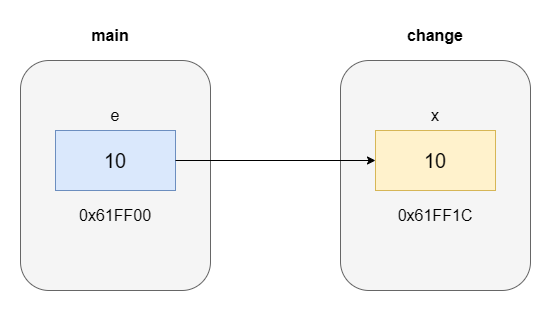
e -> 10 (original)
x -> 10 (copy)
Although the values appear identical, they are stored in separate memory locations, which is why changes do not propagate.
Real-life example (easy to understand)
Exam answer sheet scenario. Imagine this:
- You write answers on your exam papers.
- The teacher takes a photocopy of your paper.
- The teacher writes corrections on the copy.
Does your original paper change? No.
Connection to call by value
- Original paper -> original variable.
- Photocopy -> value passed to function.
- Changes -> only affect the copy.
That’s exactly how call by value works in C.
Advantages of call by value
1. Safe (no risk to original data)
- Original values remain protected.
- No accidental modification.
2. Easy to understand
- Simple and predictable behaviour.
- Ideal for beginners.
3. Good for small data
- Works efficiently when variables are small.
Limitations of call by value
1. Cannot modify original data
- Changes inside a function don’t affect the actual variable.
2. Memory overhead
- Copy of the data is created every time.
- Inefficient for large data (arrays, structures).
3. Not suitable for real-time updates
- It cannot be used when the original data must change.
When should you use call by value?
Use it when:
- You don’t want to change the original data.
- You are working with small variables.
- Safety is more important than performance.
Call by value is not a limitation — it’s a deliberate design choice that prioritizes safety and predictability. It gives you control over data safety. The real power comes from knowing when to use call by value and when to switch to call by reference.
What is call by reference in C programming
Call by reference is a powerful way of passing data to functions where, instead of sending a copy, you send the actual memory address of the variable. This means the function doesn’t work on a duplicate — it works on the original data itself.
In call by reference, the function is given direct access to the variable’s memory location through pointers, allowing it to modify the actual data.
- The function receives the memory address of the variable.
- Any modification performed inside the function is reflected immediately in the original variable.
Example
#include <stdio.h>

void change(int *x) {
  *x = 100;
}

int main() {
  int e = 10;

  change(&e);

  printf("value of e: %d", e);

  return 0;
}Output
value of e: 100The value of “e” changes because the function is working on the original memory location, not a copy.
How call by reference works (step-by-step)
Let’s understand what happens behind the scenes:
- e = 10 is stored in memory.
- &e (address of e) is passed to the function.
- The pointer “x” receives the address of “e”.
- *x = 100 updates the value at that address.
So instead of creating a copy, the function directly modifies the original variable.
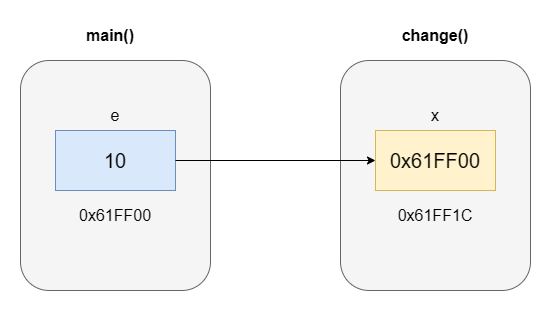
e -> 10 (original memory)
x -> address of e
*x -> modifies e directly
One memory location, multiple access points.
Real-life example
Bank account update system. Imagine your bank account:
- You deposit money.
- The bank doesn’t create a copy of your account.
- It directly updates your actual balance.
Connection to call by reference
- Account balance -> variable
- Bank system -> function
- Pointer -> direct access to account
Any update affects the real account immediately.
Advantages of call by reference
1. Modifies original data
- Direct changes reflect outside the function.
2. Memory efficient
- No data copying
- Faster for large data
3. Better performance
- Especially useful in large programs.
4. Essential for real applications
- Used in system programming.
- Required for dynamic memory operations.
Limitations of call by reference
1. Risk of unintended changes
- Original data can be modified accidentally.
2. More complex
- Requires understanding of pointers
3. Harder to debug
- Changes happen indirectly
When should call by reference be used?
Use it when:
- You need to modify the original data.
- You are working with large amounts of data.
- Performance is important.
- Memory efficiency matters.
Call by reference is what turns your program from passive (working on copies) to active (modifying real data). This is the concept that powers real-world systems, from banking software to operating systems.
Call by value vs call by reference in C (complete comparison)
It’s time to see the real difference between call by value and call by reference. This is one of the most important comparisons in C programming because it defines how your program handles data, memory, and performance.
Core difference in one line: call by value -> works on a copy of data, and call by reference -> works on the original data (via address).
Side-by-side comparison table
| Feature | Call by value | Call by reference |
| Data passed | Copy of variable | Address of variables |
| Original Value | Not changed | Changed |
| Memory Usage | More (creates copy) | Less (no copy) |
| Performance | Slower for large data | Faster |
| Safety | High (no side effects) | Moderate (can modify original data) |
| Complexity | Easy | Requires pointer knowledge |
| Use case | Small, safe operations | Real-time updates, large data |
Code comparison (for best understanding)
Understanding theory is important — but real clarity comes when you see the difference in action. Let’s take the same problem and solve it using both approaches.
Call by value (using copy)
#include <stdio.h>

void change(int x) {
  x = 50;
  printf("Inside function (value): %d\n", x);
}

int main() {
  int e = 12;
  change(e);

  printf("Outside function (value): %d\n", e);

  return 0;
}Output
Inside function (value): 50
Outside function (value): 12
The value changes inside the function, but not outside.
Call by reference (using pointer)
#include <stdio.h>

void change(int *x) {
  *x = 50;
  printf("Inside function (reference): %d\n", *x);
}

int main() {
  int e = 12;

  change(&e);

  printf("Outside function (reference): %d\n", e);

  return 0;
}Inside function (reference): 50
Outside function (reference): 50The value changes everywhere because we modified the original data.
Real-world comparison
Let’s connect this concept to real life so it becomes intuitive, not just technical.
1. Photocopy vs original document
Call by value:
- You receive a photocopy.
- You can write on it.
- Original document remains unchanged.
Call by reference:
- You get the original document.
- Any change affects the real document.
2. Bank account system
Call by value:
- Viewing balance -> no changes
Call by reference:
- Depositing money -> actual balance updates
3. Live GPS location
Call by value:
- You send a saved location (static).
Call by reference:
- You share live location -> updates in real-time
Game score system
Call by value:
- Practice mode -> score change doesn’t matter.
Call by reference:
- Real match -> score updates permanently.
Shared team dashboard
Call by value:
- Each person edits their own copy.
Call by reference:
- Everyone edits the same live dashboard.
Key takeaway
Call by value = isolation (safe, but limited)
Call by reference = connection (powerful, but requires care)
Don’t just memorize the difference, visualize it. When you can instantly map a real-world situation to call by value or reference, you’ve truly mastered the concept.
When to use call by value vs reference in C programming
Understanding the difference between call by value and call by reference is important — but knowing when to use each is truly what makes you a skilled programmer. This is where beginners become confident developers. Because in real-world coding, the question is not:
- What is call by value?
- What is call by reference?
The real question is: Which one should I use in this situation?
The core decision rule
Use call by value when you want safety, and use call by reference when you want control.
When to use call by value
1. Data should remain safe
If the original value must not be modified:
void display(int x) {
    printf("%d", x);
}
Safe — no risk of accidental changes
2. Working with small data
For variables like:
- int
- char
- float
Copying is fast and efficient.
3. Read-only operations
When you only need to:
- Print values.
- Perform calculations.
4. Avoiding side effects
Keeps your code predictable and easier to debug
When to use call by reference
Call by reference is preferred when you need to modify original data or improve performance by avoiding unnecessary copying.
1. Need to modify original data
void update(int *x) {
    *x = 200;
}
Changes affect the actual variable.
2. Working with large data
For:
- Arrays
- Structures
Passing copy is expensive -> use pointers.
3. Performance matters
- Avoids unnecessary copying
- Makes the program faster
4. Real-time systems
Used in:
- Banking systems
- Game engines
- Embedded systems
Common mistakes in C parameter passing (and how to avoid them)
The mistakes are usually small…but their impact can break your program logic completely. In this section, we’ll cover the most common mistakes developers make, along with clear explanations and fixes — so you can write bug-free and reliable code.
1. Expecting value to change in call by value
Wrong thinking: if you change the variable inside the function, the original value will change.
Problem
- Only a copy of the value is changed.
- The original variable remains unchanged.
Correct understanding
Call by value never modifies the original data.
2. Forgetting to use pointers in call by reference
Wrong Code
void change(int x) {
    x = 50;
}
This is call by value.
Correct Code
void update(int *x) {
    *x = 50;
}
Now it works as call by reference. No pointer = no call by reference.
3. Forgetting to pass the address (&)
Wrong code
int e = 50;
change(e);
Problem
- Function expects an address
- But the value is passed.
Correct code
int e = 50;
change(&e);
Always use & when calling reference-based functions.
4. Incorrect dereferencing inside function
Wrong code
void update(int *x) {
    x = 100;        // not correct
}
Problem
This changes pointer itself, not the value.
Correct code
void update(int *x) {
    *x = 100;        // correct
}
Use * to modify the actual value.
5. Confusing * and & operator
This is one of the biggest beginner confusions. “*” does not give address and “&” does not give value.
Correct Understanding
- & -> gives address
- * -> gives value
6. Overusing call by reference
Many beginners think: Pointers are powerful, so I should use them everywhere.
Problem
- Code becomes complex
- Hard to debug
- Risk of unintended changes
Use call by reference only when necessary.
7. Ignoring the function’s purpose
Another common mistake: using call by value when an update is required or using call by reference when it’s not needed.
Before writing the function, ask: Should this function change the original data?
- Yes -> call by reference
- No -> call by value
8. Not understanding memory behaviour
Think about the memory before writing the code. Memory makes the problem, leading to confusion and unexpected outputs. To solve these problems, always think that you are working on a copy or the original memory location.
Conclusion
At this point, you’ve unlocked one of the most important concepts in C programming—not just how to write functions, but how data actually behaves inside them. Call by value and call by reference are more than definitions. They define:
- Whether the program works on copies or real data.
- How efficiently code uses memory and performance.
- How safely or powerfully do functions operate?
By now, you clearly understand:
- Why don’t values change in call by value?
- How pointers make call by reference possible.
- The exact difference between the two approaches.
- When to use each in real-world programming.
- Common mistakes and how to avoid them.
This is the level where your thinking shifts from writing code to designing logic. Let’s connect everything in your learning so far:
- Functions taught you how to organize logic.
- Pointers taught you how to access memory.
- Call by reference showed you how to control real data.
Together, these concepts form the core foundation of C programming.
Why this matters in real programming
In real-world applications, this decision affects:
- System performance.
- Data accuracy.
- Memory efficiency.
- Program reliability.
Choosing the wrong method can lead to bugs. Choosing the right one leads to clean, efficient, and scalable code. Now that you understand:
- How data is passed.
- How memory is accessed and modified.
The next logical step is: Array in C programming. Because:
- Arrays store multiple values in memory.
- They are closely connected with pointers.
- Most real-world programs rely heavily on arrays.
In fact, arrays and pointers work together so closely that mastering both will take your C programming skills to the next level. Continue your journey with arrays in C programming because this is where everything you’ve learned so far — functions, pointers, and memory — comes together in practical programming.
