

String Function in C — Write Your Own Function From Scratch
Every string function you have ever used — strlen, strcpy, strcmp, strcat — is not magic. There is no secret compiler trick behind them. No special hardware instruction. Each one is a simple loop that walks through characters one by one, performs a straightforward operation, and stops when it hits ‘\0’.
That is it. Only you truly see this — once you write these functions yourself and watch them work, two things happen. First, you understand strings at a level most developers never reach. Second, you stop making the mistakes that cause buffer overflows, crashes, and security vulnerabilities, because you understand exactly what is happening at every step.
This guide does both. We cover every major function from <string.h> — what it does, how it works internally, where it fails, and when to use safer alternatives. Then we build our own versions from scratch. Clean, working, explained line by line.
This is part of our C programming series. This guide builds on:
Table of Contents
1. How string functions actually work — the mental model
Before touching a single function, lock this mental model in place. It makes everything else in this guide obvious. A C string is a sequence of characters in memory. The last character is always ‘\0’. Every string function works by exploiting this one fact — it starts at the beginning and keeps moving forward until it either finds ‘\0’ or finds what it is looking for.
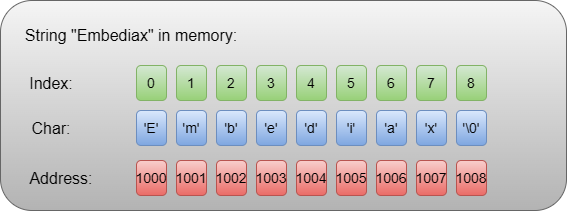
Every function you will learn in this guide is built on one of these three patterns:
Pattern 1 — Walk until null (strlen, puts)
while(str[i] != '\0') {
  do something;
  i++;
}Pattern 2 — Walk and copy until null (strcpy, strcat)
while((*dest++ = *src++) != '\0');Pattern 3 — Walk and compare until null or mismatch (strcmp)
while(*a && *a == *b) {
  a++;
  b++;
}Every single standard string function is a variation of one of these three patterns. Keep this in mind, and nothing in this guide will feel complicated.
2. The string.h library — What is inside
Including <string.h> gives you access to over 20 functions. Here are the ones every C programmer must know, grouped by purpose:
Length and information
strlen — get string length
Copying
strcpy, strncpy — copy a string.
Concatenation
strcat, strncat — join two strings
Comparison
strcmp, strncmp, strcasecmp — compare strings
Searching
strchr, strrchr, strstr, strpbrk, strcspn, strspn — find characters or substrings.
Splitting
strtok, strtok_r — split by delimiter
Memory operations
memcpy, memset, memcmp, memmove — raw memory manipulation
Conversion (from stdlib.h and stdio.h)
atoi, atof, sprintf, snprintf — convert between strings and numbers
We will cover the most important ones with real depth. Not just “here is the syntax” — but how they work, where they break, and what to use instead when they are dangerous.
3. strlen — Length of a string
Returns the number of characters in a string, not counting the null terminator.
Syntax
size_t strlen(const char *str);Basic usage
#include <stdio.h>
#include <string.h>

int main() {
    char name[] = "Embediax";
    printf("Length: %zu\n", strlen(name));   // 8

    char empty[] = "";
    printf("Empty: %zu\n", strlen(empty));   // 0

    char city[] = "New Delhi";
    printf("City: %zu\n", strlen(city));     // 9

    return 0;
}Output
Length: 8
Empty: 0
City: 9
How it works internally
// strlen starts at index 0 and counts until '\0'
// "Programming" → E-m-b-e-d-i-a-x-\0
//                 1 2 3 4 5 6 7 8 9  stop
The critical distinction — strlen vs sizeof
char buf[100] = "Embediax";

strlen(buf);    // 8  — characters in the string
sizeof(buf); // 100 — total buffer size allocatedThese are different numbers, and they serve different purposes. strlen tells you how many characters are in the buffer. sizeof tells you how big the buffer is. You need to know both.
Performance trap — never call strlen in a loop condition
// SLOW — strlen scans the entire string on every iteration
for (int i = 0; i < strlen(str); i++) { }

// FAST — compute once, reuse
size_t len = strlen(str);
for (int i = 0; i < len; i++) { }strlen is O(n) — it scans every character. Calling it in a loop makes the whole loop O(n²). For short strings, this does not matter. For large data processing, it can be the difference between fast and unusably slow.
4. strcpy and strncpy — Copying strings
Copy the contents of one string into another buffer.
Syntax
char *strcpy(char *dest, const char *src);
char *strncpy(char *dest, const char *src, size_t n);Basic strcpy
#include <stdio.h>
#include <string.h>

int main() {
    char src[]  = "Hello, Embediax!";
    char dest[20];

    strcpy(dest, src);
    printf("%s\n", dest);   // Hello, Embediax!

    return 0;
}Output
Hello, Embediax!How strcpy works — character by character
src:  [ H ][ e ][ l ][ l ][ o ][ , ][ E ][ m ][ b ][ e ][ d ][ i ][ a ][ x ][ ! ][\0 ]
dest: [ H ][ e ][ l ][ l ][ o ][ , ][ E ][ m ][ b ][ e ][ d ][ i ][ a ][ x ][ ! ][\0 ]
       ↑ copied one by one until '\0' is copied
The danger of strcpy
char small[5];
strcpy(small, "Hello World"); // Buffer overflow — writes 12 bytes into 5-byte bufferstrcpy has no idea how big dest is. It copies until it hits ‘\0’ in src — no questions asked. If dest is too small, it writes into memory it does not own.
Safe alternative — strncpy
char dest[10];
char src[] = "Hello World";

strncpy(dest, src, sizeof(dest) - 1);
dest[sizeof(dest) - 1] = '\0';   // ALWAYS manually null-terminate

printf("%s\n", dest); // Hello Wor (truncated safely)Important warning about strncpy
If src is longer than n, strncpy copies n characters but does not add ‘\0’. You must always add it manually. This trips up even experienced developers.
Best modern alternative — snprintf
snprintf(dest, sizeof(dest), "%s", src);
// Always null-terminated, always safe, no manual '\0' neededUse snprintf over strncpy in new code. It is safer, clearer, and handles the null terminator automatically.
5. strcat and strncat — Joining strings
Append one string to the end of another.
Syntax
char *strcat(char *dest, const char *src);
char *strncat(char *dest, const char *src, size_t n);Basic usage
#include <stdio.h>
#include <string.h>

int main() {
    char greeting[30] = "Hello";
    strcat(greeting, ", Embediax");
    strcat(greeting, "!");
    printf("%s\n", greeting);   // Hello, Embediax!

    return 0;
}Output
Hello, Embediax!How strcat works
Before:
dest: [ H ][ e ][ l ][ l ][ o ][\0 ][ ? ][ ? ]...
                                ↑ strcat finds this '\0'

After strcat(dest, " Embediax"):
dest: [ H ][ e ][ l ][ l ][ o ][ ][ E ][ m ][ b ][ e ][ d ][ i ][ a ][ x ][\0 ]
                                ↑ starts writing here, overwrites '\0'
strcat first walks to the end of dest (finding ‘\0’), then copies src starting from that point. It is essentially a strlen followed by a strcpy. This means it is O(n + m) — the longer your strings, the more work it does finding the end.
The danger — same as strcpy, no bounds checking
char buf[10] = "Hello";
strcat(buf, " Embediax!!!"); // Overflow — "Hello Embediax!!!" needs 15 bytesSefe alternative — strncat
char dest[20] = "Hello";
strncat(dest, " Embediax!!!", sizeof(dest) - strlen(dest) - 1);
printf("%s\n", dest); // Hello Embediax!!! (or truncated safely)The formula sizeof(dest) - strlen(dest) - 1 calculates exactly how many characters are left in the buffer. This is the correct pattern.
6. strcmp and strncmp — Comparing strings
Compare two strings lexicographically (dictionary order).
Syntax
int strcmp(const char *str1, const char *str2);
int strncmp(const char *str1, const char *str2, size_t n);Return values
- 0 — strings are equal
- < 0 — str1 comes before str2
- > 0 — str1 comes after str2
Basic usage
#include <stdio.h>
#include <string.h>

int main() {
    printf("%d\n", strcmp("apple", "apple"));    //  0 — equal
    printf("%d\n", strcmp("apple", "banana"));   // <0 — apple before banana
    printf("%d\n", strcmp("mango", "apple"));    // >0 — mango after apple
    printf("%d\n", strcmp("abc", "abd"));        // <0 — differs at index 2
    return 0;
}Output
0
-1
1
-1
How strcmp works
Comparing "abc" and "abd":
'a' == 'a' → continue
'b' == 'b' → continue
'c' != 'd' → return 'c' - 'd' = 99 - 100 = -1 (negative)
It compares character by character. The moment it finds a difference, it returns the difference of those two character values. If it reaches ‘\0’ in both strings simultaneously, they are equal.
The most common mistake in all of C
char input[] = "yes";

// WRONG — compares memory addresses, almost always false
if (input == "yes") { printf("correct\n"); }

// CORRECT — compares actual characters
if (strcmp(input, "yes") == 0) { printf("correct\n"); }This mistake is so common and so subtle that it deserves its own callout box in every C tutorial ever written. == on strings compares addresses. strcmp compares content. Always use strcmp.
Case-insensitive comparison
// Not standard C but available on most systems
#include <strings.h>   // Note: strings.h not string.h

strcasecmp("Hello", "hello"); // 0 — equal ignoring caseFor strictly portable code, convert both strings to the same case first, then use strcmp.
7. strchr and strrchr — Searching for a character
strchr — finds the first occurrence of a character in a string.
strrchr — finds the last occurrence of a character in a string.
Syntax
char *strchr(const char *str, int ch);
char *strrchr(const char *str, int ch);Both return a pointer to the found character, or NULL if not found.
Usage
#include <stdio.h>
#include <string.h>

int main() {
    char str[] = "programming";

    // Find first 'g'
    char *first = strchr(str, 'g');
    if (first)
        printf("First 'g' at index: %ld\n", first - str);   // 3

    // Find last 'g'
    char *last = strrchr(str, 'g');
    if (last)
        printf("Last 'g' at index: %ld\n", last - str);     // 10

    // Check if character exists
    if (strchr(str, 'z') == NULL)
        printf("'z' not found\n");

    return 0;
}Output
First 'g' at index: 3
Last 'g' at index: 10
'z' not found
Practical use — extracting file extension
char filename[] = "report_final.pdf";
char *dot = strrchr(filename, '.');

if (dot)
printf("Extension: %s\n", dot + 1); // pdfThis is a real pattern used in file handling code everywhere.
8. strstr — Finding a substring
Finds the first occurrence of a substring within a string.
Syntax
char *strstr(const char *haystack, const char *needle);Returns a pointer to where needle begins inside haystack, or NULL if not found.
Usage
#include <stdio.h>
#include <string.h>

int main() {
    char text[] = "Welcome to C programming world";
    char *found;

    found = strstr(text, "programming");
    if (found)
        printf("Found at index: %ld\n", found - text);   // 11

    found = strstr(text, "Python");
    if (found == NULL)
        printf("Python not found\n");

    // Replace a substring (manual approach)
    char sentence[] = "I love cats and cats love me";
    char *pos = strstr(sentence, "cats");
    if (pos) {
        strncpy(pos, "dogs", 4);   // Replace first "cats" with "dogs"
        printf("%s\n", sentence);  // I love dogs and cats love me
    }

    return 0;
}Output
Found at index: 13
Python not found
I love dogs and cats love me
9. strtok — Splitting a string
Splits a string into tokens based on delimiter characters.
Syntax
char *strtok(char *str, const char *delimiters);Usage
#include <stdio.h>
#include <string.h>

int main() {
    char csv[] = "Alice,25,Engineer,Delhi";

    char *token = strtok(csv, ",");
    while (token != NULL) {
        printf("%s\n", token);
        token = strtok(NULL, ",");   // Pass NULL for subsequent calls
    }

    return 0;
}Output
Alice
25
Engineer
Delhi
How strtok works
"Alice,25,Engineer,Delhi"
       ↑ strtok replaces ',' with '\0', returns pointer to "Alice"

"Alice\025\0Engineer\0Delhi"
            ↑ next call returns pointer to "25"
It inserts ‘\0’ characters into your string at each delimiter. This is why strtok modifies the original string and why you should never use it on a string literal.
Three rules for strtok
- First call passes the string. All subsequent calls pass NULL.
- It modifies the original string — always work on a copy if you need the original.
- It is not thread-safe — use
strtok_rin multi-threaded programs.
// Thread-safe version
char *saveptr;
char *token = strtok_r(str, ",", &saveptr);
while (token != NULL) {
    printf("%s\n", token);
    token = strtok_r(NULL, ",", &saveptr);
}Image suggestion
Step-by-step diagram showing strtok inserting null terminators into a comma-separated string, with arrows showing what each call returns.
10. sprintf and snprintf — Building strings
Format and write output into a string buffer instead of printing to the screen.
Syntax
int sprintf(char *buf, const char *format, ...);
int snprintf(char *buf, size_t size, const char *format, ...);Usage
#include <stdio.h>

int main() {
    char message[100];
    int age = 22;
    char name[] = "Arjun";

    // Build a formatted string
    snprintf(message, sizeof(message), "My name is %s and I am %d years old.", name, age);
    printf("%s\n", message);
    // My name is Arjun and I am 22 years old.

    // Convert integer to string
    char num_str[20];
    snprintf(num_str, sizeof(num_str), "%d", 12345);
    printf("String: %s\n", num_str);   // String: 12345

    // Build a filename dynamically
    char filename[50];
    int report_id = 7;
    snprintf(filename, sizeof(filename), "report_%03d.txt", report_id);
    printf("%s\n", filename);   // report_007.txt

    return 0;
}Output
My name is Arjun and I am 22 years old.
String: 12345
report_007.txt
Always use snprintf over sprintf. The n version limits how many characters are written, preventing buffer overflow. sprintf has the same danger as strcpy — no bounds checking.
11. Write your own — strlen
Now, the part that makes this guide different from every other one. We build each function from scratch. No black boxes. Every line explained.
#include <stdio.h>

size_t my_strlen(const char *str) {
    size_t length = 0;

    // Walk forward until we hit the null terminator
    while (str[length] != '\0') {
        length++;
    }

    return length;
}

int main() {
    printf("%zu\n", my_strlen("Hello"));         // 5
    printf("%zu\n", my_strlen("C Programming")); // 13
    printf("%zu\n", my_strlen(""));              // 0
    return 0;
}What is happening
- Start at index 0.
- Keep incrementing as long as the character is not ‘\0‘.
- The moment we hit ‘\0’, length holds the count of all characters before it.
- Return that count.
Pointer version — more idiomatic C
size_t my_strlen_ptr(const char *str) {
    const char *start = str;

    while (*str != '\0')
        str++;

    return str - start;   // Pointer subtraction = number of elements between them
}Both versions are correct. The pointer version is how most real implementations look.
12. Write your own — strcpy
#include <stdio.h>

char *my_strcpy(char *dest, const char *src) {
    char *original_dest = dest;   // Save start position to return later

    // Copy each character including the null terminator
    while (*src != '\0') {
        *dest = *src;
        dest++;
        src++;
    }

    *dest = '\0';   // Don't forget to null-terminate the destination

    return original_dest;
}

int main() {
    char buffer[20];

    my_strcpy(buffer, "Hello World");
    printf("%s\n", buffer);   // Hello World

    my_strcpy(buffer, "C");
    printf("%s\n", buffer);   // C

    return 0;
}Compact version using pointer idiom
char *my_strcpy_compact(char *dest, const char *src) {
    char *start = dest;
    while ((*dest++ = *src++) != '\0');
    return start;
}This single line while ((*dest++ = *src++) != '\0') is classic C. It copies the character, increments both pointers, and checks if the copied character was ‘\0’. When it copies the null terminator, the condition becomes false and the loop ends.
Self version with bounds checking
char *my_strncpy(char *dest, const char *src, size_t n) {
    size_t i;

    for (i = 0; i < n - 1 && src[i] != '\0'; i++)
        dest[i] = src[i];

    dest[i] = '\0';   // Always null-terminate
    return dest;
}13. Write your own — strcmp
#include <stdio.h>

int my_strcmp(const char *str1, const char *str2) {

    // Walk both strings simultaneously
    while (*str1 != '\0' && *str2 != '\0') {

        if (*str1 != *str2) {
            // Found a difference — return which is larger
            return (unsigned char)*str1 - (unsigned char)*str2;
        }

        str1++;
        str2++;
    }

    // Reached end of one or both strings
    // If both ended: equal (return 0)
    // If one ended first: the shorter one is "less"
    return (unsigned char)*str1 - (unsigned char)*str2;
}

int main() {
    printf("%d\n", my_strcmp("apple", "apple"));    // 0
    printf("%d\n", my_strcmp("apple", "apply"));    // negative
    printf("%d\n", my_strcmp("zebra", "apple"));    // positive
    printf("%d\n", my_strcmp("abc", "abcd"));       // negative (shorter)
    return 0;
}Why (unsigned char) cast? Because char can be signed on some systems. Without the cast, characters above 127 (like accented letters) would compare incorrectly. The cast ensures consistent, correct behavior with extended characters.
Case-insensitive version
#include <ctype.h>

int my_strcasecmp(const char *a, const char *b) {
    while (*a && *b) {
        int diff = tolower((unsigned char)*a) - tolower((unsigned char)*b);
        if (diff != 0) return diff;
        a++;
        b++;
    }
    return tolower((unsigned char)*a) - tolower((unsigned char)*b);
}14. Write your own — strcat
#include <stdio.h>
#include <string.h>

char *my_strcat(char *dest, const char *src) {
    char *original_dest = dest;

    // Step 1: Walk to the end of dest (find its '\0')
    while (*dest != '\0')
        dest++;

    // Step 2: Copy src starting from that position
    while (*src != '\0') {
        *dest = *src;
        dest++;
        src++;
    }

    // Step 3: Null-terminate the result
    *dest = '\0';

    return original_dest;
}

int main() {
    char result[30] = "Hello";

    my_strcat(result, ", ");
    my_strcat(result, "World");
    my_strcat(result, "!");

    printf("%s\n", result);   // Hello, World!
    return 0;
}What is happening visually
Start:   dest = "Hello\0............"
                       ↑ Step 1 finds this position

After:   dest = "Hello, World!\0....."
                 ↑ Step 2 writes here from the '\0' onward
The two-step process — find the end, then copy — is exactly what the standard strcat does.
15. Write your own — strrev
The standard C library does not include a string reversal function (though some compilers provide strrev as an extension). Here is a clean, portable implementation:
#include <stdio.h>
#include <string.h>

char *my_strrev(char *str) {
    int left  = 0;
    int right = strlen(str) - 1;

    while (left < right) {
        // Swap characters at left and right
        char temp   = str[left];
        str[left]   = str[right];
        str[right]  = temp;

        left++;
        right--;
    }

    return str;
}

int main() {
    char word[] = "programming";
    printf("%s\n", my_strrev(word));   // gnimmargorp

    char palindrome[] = "racecar";
    printf("%s\n", my_strrev(palindrome));   // racecar (unchanged)

    char sentence[] = "Hello";
    printf("%s\n", my_strrev(sentence));   // olleH

    return 0;
}How the swap works
"Hello"
 H e l l o
 ↑       ↑   Swap H and o → "oellH"
   ↑   ↑     Swap e and l → "olleH"
     ↑       Middle — no swap needed
Result: "olleH"
16. Write your own — strcount
Count how many times a character appears in a string. The standard library does not have this — it is a function you will end up needing in real projects.
#include <stdio.h>
#include <string.h>

int my_strcount(const char *str, char ch) {
    int count = 0;

    while (*str != '\0') {
        if (*str == ch)
            count++;
        str++;
    }

    return count;
}

// Count substring occurrences
int my_strcount_sub(const char *str, const char *sub) {
    int count = 0;
    size_t sub_len = strlen(sub);

    while ((str = strstr(str, sub)) != NULL) {
        count++;
        str += sub_len;   // Move past this occurrence
    }

    return count;
}

int main() {
    char text[] = "banana";

    printf("'a' count: %d\n", my_strcount(text, 'a'));       // 3
    printf("'n' count: %d\n", my_strcount(text, 'n'));       // 2
    printf("'z' count: %d\n", my_strcount(text, 'z'));       // 0

    char sentence[] = "the cat sat on the mat";
    printf("'the' count: %d\n", my_strcount_sub(sentence, "the"));  // 2

    return 0;
}17. Write your own — strpalindrome
#include <stdio.h>
#include <string.h>
#include <ctype.h>

int my_strpalindrome(const char *str) {
    int left  = 0;
    int right = strlen(str) - 1;

    while (left < right) {
        // Case-insensitive comparison
        if (tolower((unsigned char)str[left]) !=
            tolower((unsigned char)str[right]))
            return 0;   // Not a palindrome

        left++;
        right--;
    }

    return 1;   // Is a palindrome
}

int main() {
    printf("%s\n", my_strpalindrome("racecar") ? "Palindrome" : "Not");  // Palindrome
    printf("%s\n", my_strpalindrome("Madam")   ? "Palindrome" : "Not");  // Palindrome
    printf("%s\n", my_strpalindrome("hello")   ? "Palindrome" : "Not");  // Not
    printf("%s\n", my_strpalindrome("Level")   ? "Palindrome" : "Not");  // Palindrome
    printf("%s\n", my_strpalindrome("a")       ? "Palindrome" : "Not");  // Palindrome
    return 0;
}18. Write your own — strsplit
Split a string by a delimiter and store the results. This is something you will need constantly in real programs — reading CSV data, parsing config files, processing user input.
#include <stdio.h>
#include <stdlib.h>
#include <string.h>

// Returns array of strings, sets count to number of tokens
// Caller must free each token and the array itself
char **my_strsplit(const char *str, char delimiter, int *count) {
    *count = 0;

    // Count how many tokens we will have
    int tokens = 1;
    for (int i = 0; str[i] != '\0'; i++)
        if (str[i] == delimiter)
            tokens++;

    // Allocate array of pointers
    char **result = (char **)malloc(tokens * sizeof(char *));
    if (!result) return NULL;

    // Make a working copy — strtok modifies the string
    char *copy = (char *)malloc(strlen(str) + 1);
    if (!copy) { free(result); return NULL; }
    strcpy(copy, str);

    // Split using strtok
    char delim_str[2] = {delimiter, '\0'};
    char *token = strtok(copy, delim_str);
    int i = 0;

    while (token != NULL) {
        result[i] = (char *)malloc(strlen(token) + 1);
        strcpy(result[i], token);
        i++;
        token = strtok(NULL, delim_str);
    }

    free(copy);
    *count = tokens;
    return result;
}

int main() {
    int count;
    char **parts = my_strsplit("Alice,25,Engineer,Delhi", ',', &count);

    printf("Found %d parts:\n", count);
    for (int i = 0; i < count; i++) {
        printf("  [%d] %s\n", i, parts[i]);
        free(parts[i]);   // Free each string
    }
    free(parts);   // Free the array

    return 0;
}Output
Found 4 parts:
  [0] Alice
  [1] 25
  [2] Engineer
  [3] Delhi
19. Conclusion
You started this guide knowing what string functions do. You finish it knowing how they work — and more importantly, you can now write them yourself. That changes everything. When you implement strlen and watch it walk character by character to the null terminator, it stops being a mystery. When you write strcpy and manually null-terminate the destination, you understand instantly why forgetting that byte causes crashes. When you build strsplit from scratch, CSV parsing and config file reading stop feeling like black magic. Here is what you now own:
- Every major function in
<string.h>— not just the syntax but the internal logic, the failure modes, and the safer alternatives. - Your own implementations of
strlen,strcpy,strcmp,strcat,strrev,strcount,strpalindrome, andstrsplit. - A complete, working string utility library you can use in real projects today
- The mental model that makes every future string problem approachable — walk the characters, find the null, do something useful
Strings are behind every input field, every file read, every network message, every configuration file. Mastering them at this level means you are equipped for real C programming — not just the kind that works in tutorials, but the kind that holds up in production. The journey through C’s core concepts is building into something powerful. You understand arrays, pointers, their relationship, strings, and now string functions at a deep level.
