

Strings in C Programming
Every program works with text. Names, messages, commands, file paths, user input — all of it is text. And in C, text means strings. But here is what no one tells beginners upfront: C has no built-in string type.
Unlike Python, Java, or JavaScript, where strings are first-class citizens with built-in methods and automatic memory management — C has nothing of the sort. In C, a string is just a sequence of characters stored in memory, terminated by a special character that signals the end. That is it. No length tracking, no automatic resizing, no safety nets. This simplicity is powerful. It is also dangerous.
Understanding strings in C means understanding how memory works, why char[] and char * behave differently, what the null terminator actually does, how standard library functions work under the hood, and where the bugs hide that have crashed production software for decades.
That is exactly what this guide covers — completely, clearly, and with working code at every step.
This article is the part of our C programming series. The concepts here build directly on what we covered previously:
Learn Functions in C with Real-Life Coding Examples (2026 Guide)
Pointers in C Programming Explained with Practical Examples (2026 Guide)
Arrays in C Programming: Complete Guide with Examples (2026 Guide)
Multi-Dimensional Arrays in C Programming (Complete Guide with Examples – 2026)
Arrays vs Pointers in C – The Truth Behind the Confusion (Complete Guide 2026)
If you have not read the arrays vs pointers guide yet, read it first. Strings in C are where everything from that guide becomes real and practical.
Table of Contents
1. What is a string in C?
In C, a string is an array of characters terminated by a null character ‘\0’. The null character has an ASCII value of 0 and is the only way C knows where a string ends. There is no string type. No String object. No .length() method. Just characters in memory with a ‘\0’ at the end.
// This string:
"Embediax"

// Is stored in memory as:
'E' 'm' 'b' 'e' 'd' 'i' 'a' 'x' '\0'Six characters, not five. The null terminator is always there, always silent, and always essential. Every single string function in C — strlen, strcpy, printf with %s — depends on finding that ‘\0’ to know where the string ends. Remove it, and every string operation on that data becomes undefined behavior.
2. The null terminator — the character that changes everything
The null terminator ‘\0’ is the foundation of every string in C. Understanding it deeply prevents an entire class of bugs.
char name[9] = {'E', 'm', 'b', 'e', 'd', 'i', 'a', 'x', '\0'};  // Correct string
char bad[8] = {'E', 'm', 'b', 'e', 'd', 'i', 'a', 'x'}; // NOT a string — missing '\0'name is a proper C string. bad is just an array of characters. If you pass bad to printf(“%d”) or strlen(), those functions will keep reading memory past the end of your array, looking for a ‘\0’ that is not there. This is a buffer overread — undefined behaviour that can crash your program or expose sensitive data from memory.
How strlen uses the null terminator
// This is essentially what strlen does internally
size_t my_strlen(const char *s) {
    size_t count = 0;
    while (s[count] != '\0')
        count++;
    return count;
}It starts at the first character and keeps counting until it finds ‘\0’. No null terminator means it never stops.
Key facts about the null terminator
- ‘\0’ is not the same as ‘0’. ‘\0’ has ASCII value 0. ‘0’ has ASCII value 48.
- ‘\0’ is not the same as 0 syntactically, but they are equal in value. ‘\0’ == 0 is true.
- Every string literal in C automatically includes a ‘\0’ at the end. You do not write it — the compiler adds it.
- Always allocate one extra byte for the null terminator when sizing character arrays.
char city[6] = "Delhi";   // 5 chars + 1 null = 6 bytes needed — correct
char city[5] = "Delhi"; // No room for '\0' — undefined behavior3. Declaring strings — four ways and when to use each
Method 1 — character array with string literal (most common)
char name[] = "Embediax";The compiler calculates the size automatically — 8 characters + 1 null terminator = 9 bytes. The string is stored on the stack and is fully modifiable.
Method 2 — character array with explicit size
char name[50] = "Embediax";Allocates 50 bytes. The first 9 are used (E, m, b, e, d, i, a, x, \0). The remaining 41 bytes are automatically set to zero. Use this when you need a buffer for user input or string manipulation.
Method 3 — character pointer to string literal
char *name = "Embediax";name is a pointer to a string literal stored in read-only memory. You can read it. You cannot modify it. Attempting to do so is undefined behavior — almost certainlyresulting in a segmentation fault.
Method 4 — character array with individual characters
char name[] = {'E', 'm', 'b', 'e', 'd', 'i', 'a', 'x', '\0'};Explicit and clear about every character, including the null terminator. Rarely used in practice, but good for understanding what a string actually is.
Quick decision guide
- Need to modify the string? ->
char name[] = "..." - Need a buffer for input? ->
char name[N]with a size. - Just reading, never modifying? ->
const char *name = "...” - Size determined at runtime? -> malloc
4. char array vs char pointer — the critical difference
This is the section that separates developers who understand C strings from those who just use them and hope for the best.
This distinction flows directly from what we covered in our Arrays vs Pointers in C – The Truth Behind the Confusion (Complete Guide 2026) guide. If the concepts of decay and sizeof are not fresh, revisit that guide first.
char arr[] = "Hello";   // Array — modifiable, stack
char *ptr = "Hello"; // Pointer — read-only memoryThey look almost identical. They behave very differently.
Difference 1 — modifiability
arr[0] = 'h';   // Legal — arr owns the memory
ptr[0] = 'h'; // CRASH — ptr points to read-only memoryDifference 2 — sizeof
printf("%zu\n", sizeof(arr));   // 6 — full array (5 chars + null)
printf("%zu\n", sizeof(ptr)); // 8 — just the pointer (64-bit system)Difference 3 — what lives where in memory
char arr[] = "Hello":
Stack: [ H ][ e ][ l ][ l ][ o ][\0 ]
        ↑ arr points here (data is HERE on stack)

char *ptr = "Hello":
Stack: [ ptr: 0x4000 ]    ← just the pointer variable
                ↓
Read-only (.rodata): [ H ][ e ][ l ][ l ][ o ][\0 ]
Difference 4 — reassignment
ptr = "World";   // Legal — ptr now points to a different literal
arr = "World"; // ILLEGAL — cannot reassign an array nameThe golden rule
If you ever need to modify a string, declare it as char array[]. If you are only reading it and it never changes, use const char*. Never use a non-const char * for string literal — it is a crash waiting to happen.
5. How strings live in memory
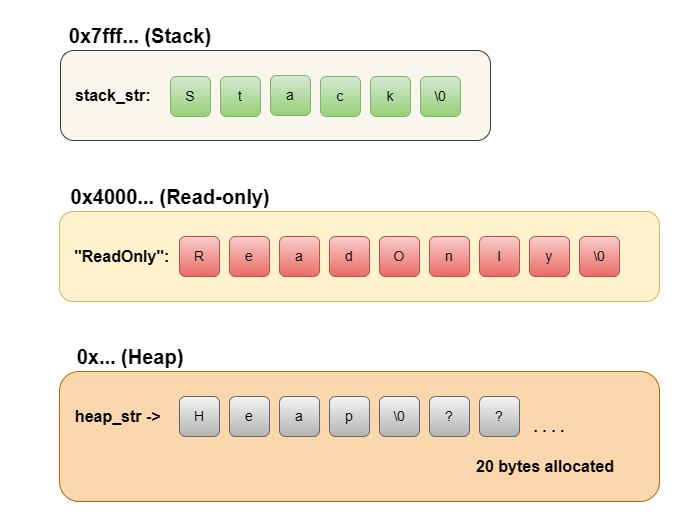
Understanding memory placement makes everything else click. In a typical C program, memory is divided into segments:
Stack
Local variables, including char arr[] = "Hello". Fast, automatically managed, limited in size.
Read-only data segment (.rodata)
String literals like “Hello”. Loaded once when the program starts. Cannot be modified. Shared — if you write “Hello” in ten places, the compiler may store it only once.
Heap
Dynamically allocated strings using malloc. Programmer-managed. Must be freed manually.
#include <stdio.h>
#include <stdlib.h>
#include <string.h>

int main() {
    // Stack — modifiable
    char stack_str[] = "Stack";

    // Read-only — do NOT modify
    const char *ro_str = "ReadOnly";

    // Heap — modifiable, must free
    char *heap_str = (char *)malloc(20 * sizeof(char));
    strcpy(heap_str, "Heap");

    printf("%s\n", stack_str);   // Stack
    printf("%s\n", ro_str);      // ReadOnly
    printf("%s\n", heap_str);    // Heap

    free(heap_str);   // Always free heap memory
    return 0;
}Output
Stack
ReadOnly
Heap
Memory layout visualization
6. Reading string input from the user
Getting string input from users is one of the most common sources of security vulnerabilities in C programs. Here is how to do it correctly.
Never use gets() — it is dangerous and removed from C11
char name[50];
gets(name); // NEVER USE THIS — no bounds checking, buffer overflowgets() reads until a newline with no limit on input length. If the user types more than 49 characters, it writes past the end of your array — a classic buffer. It was so dangerous that it was removed from the C standard in C11.
Use fgets() — the safe choice
#include <stdio.h>

int main() {
    char name[50];

    printf("Enter your name: ");
    fgets(name, sizeof(name), stdin);

    // fgets keeps the newline '\n' — remove it
    name[strcspn(name, "\n")] = '\0';

    printf("Hello, %s!\n", name);
    return 0;
}fgets(buffer, size, stream) reads at most size – 1 characters, always adds ‘\0’, and stops at a newline. It is safe, standard, and correct.
The newline issue
fgets keeps the ‘\n’ in the buffer. The line name[strcspn(name, “\n”)] = ‘\0’ finds the newline and replaces it with a null terminator — the cleanest way to strip it.
Using scanf for strings
char name[50];
scanf("%49s", name); // Reads until whitespace, max 49 charsscanf with %s stops at whitespace, so it cannot read multi-word input. Always specify the width (%49s for a 50-byte buffer) to prevent overflow. Note: no & before name — array names decay to pointers.
Reading strings with spaces
char sentence[100];
scanf(" %99[^\n]", sentence); // Reads entire line including spacesThe format %[^\n] means “read everything that is not a newline”. The leading space skips any leftover whitespace from previous input.
7. Common string operations with code
Check if a string is a palindrome
#include <stdio.h>
#include <string.h>
#include <ctype.h>

int isPalindrome(const char *str) {
    int left = 0;
    int right = strlen(str) - 1;

    while (left < right) {
        if (tolower(str[left]) != tolower(str[right]))
            return 0;
        left++;
        right--;
    }
    return 1;
}

int main() {
    printf("%d\n", isPalindrome("racecar"));   // 1 — yes
    printf("%d\n", isPalindrome("Madam"));     // 1 — yes (case-insensitive)
    printf("%d\n", isPalindrome("hello"));     // 0 — no
    return 0;
}Count occurrences of a character
int countChar(const char *str, char ch) {
    int count = 0;
    while (*str) {
        if (*str == ch) count++;
        str++;
    }
    return count;
}Convert string to integer (manual)
int my_atoi(const char *str) {
    int result = 0;
    int sign = 1;

    if (*str == '-') { sign = -1; str++; }
    if (*str == '+') { str++; }

    while (*str >= '0' && *str <= '9') {
        result = result * 10 + (*str - '0');
        str++;
    }
    return sign * result;
}Convert all characters to uppercase
#include <ctype.h>

void toUpperCase(char *str) {
    while (*str) {
        *str = toupper(*str);
        str++;
    }
}8. Dynamic strings — allocating at runtime
When you do not know the string length at compile time, allocate on the heap using malloc.
#include <stdio.h>
#include <stdlib.h>
#include <string.h>

char *createString(const char *text) {
    // strlen + 1 for the null terminator
    char *str = (char *)malloc(strlen(text) + 1);

    if (str == NULL) {
        fprintf(stderr, "Memory allocation failed\n");
        return NULL;
    }

    strcpy(str, text);
    return str;
}

char *concatStrings(const char *a, const char *b) {
    size_t len = strlen(a) + strlen(b) + 1;
    char *result = (char *)malloc(len);

    if (result == NULL) return NULL;

    strcpy(result, a);
    strcat(result, b);
    return result;
}

int main() {
    char *greeting = createString("Hello");
    char *message  = concatStrings(greeting, ", World!");

    printf("%s\n", message);   // Hello, World!

    free(greeting);
    free(message);
    return 0;
}Rules for dynamic strings
- Always allocate strlen(tect) +1 — the +1 is for ‘\0’.
- Always check if malloc returned NULL before using the pointer.
- Always free() when done — every malloc must have a matching free.
- Never use a freed string — set the pointer to NULL after freed.
9. Array of strings in C
An array of strings is an array where each element is itself a string. There are two common ways to create one.
Method 1 — 2D char array (fixed size)
char fruits[4][20] = {
    "Apple",
    "Banana",
    "Mango",
    "Orange"
};

for (int i = 0; i < 4; i++)
printf("%s\n", fruits[i]);Each row is 20 bytes wide. Every string must fit within 20 characters, including the null terminator. Memory is contiguous and fixed — simple but wastes space if strings have very different lengths.
Method 2 — Array of char pointers (flexible)
const char *fruits[] = {
    "Apple",
    "Banana",
    "Mango",
    "Orange"
};

for (int i = 0; i < 4; i++)
printf("%s\n", fruits[i]);Each pointer points to a string literal. No wasted space — each string takes exactly the memory it needs. However, these strings are read-only. Do not attempt to modify them.
Method 3 — Dynamic array of dynamic strings
int n = 4;
char **names = (char **)malloc(n * sizeof(char *));

names[0] = (char *)malloc(10); strcpy(names[0], "Alice");
names[1] = (char *)malloc(10); strcpy(names[1], "Bob");
names[2] = (char *)malloc(10); strcpy(names[2], "Charlie");
names[3] = (char *)malloc(10); strcpy(names[3], "Diana");

for (int i = 0; i < n; i++)
    printf("%s\n", names[i]);

// Free each string, then the array
for (int i = 0; i < n; i++)
    free(names[i]);
free(names);Fully dynamic and flexible. Use this when both the number of strings and their lengths are determined at runtime.
10. The most dangerous string mistakes in C
These are the mistakes that have caused real-world software vulnerabilities, data breaches, and system crashes. Know them — avoid them.
Mistake 1 — Buffer overflow
char buf[5];
strcpy(buf, "Hello World"); // Writes 12 bytes into a 5-byte bufferOne of the most exploited vulnerabilities in software history. Always know your buffer size. Always use bounded functions like strncpy or snprintf.
Mistake 2 — Missing Null terminator
char name[5] = {'H', 'e', 'l', 'l', 'o'};   // No '\0'
printf("%s\n", name); // Reads past the array — undefined behaviorAlways ensure your character arrays end with '\0' before passing them to any string function.
Mistake 3 — Comparing strings with ==
char a[] = "test";
char b[] = "test";

if (a == b) { }           // WRONG — always false (different addresses)
if (strcmp(a, b) == 0) { } // CORRECTMistake 4 — Modifying a string literal
char *str = "Hello";
str[0] = 'h'; // Undefined behavior — segmentation faultUse char str[] = "Hello" if you need to modify it.
Mistake 5 — Using gets()
gets(buffer); // Never. Not once. Not for testing.Use fgets(). Every time. No exceptions.
Mistake 6 — Off-by-one in buffer allocation
char *copy = malloc(strlen(original));      // WRONG — no room for '\0'
char *copy = malloc(strlen(original) + 1); // CORRECTstrlen does not count the null terminator. malloc must allocate for it.
Mistake 7 — Using freed memory
char *str = malloc(20);
strcpy(str, "Hello");
free(str);
printf("%s\n", str);   // Undefined behavior — str is freed
str = NULL; // Always do this after freeMistake 8 — strtok on a string literal
char *result = strtok("one,two,three", ","); // CRASH — literal is read-onlystrtok modifies the string. Always pass a writable copy:
char data[] = "one,two,three";   // Stack copy — writable
char *token = strtok(data, ",");11. Conclusion
Strings in C are deceptively simple on the surface — just characters in memory with a ‘\0’ at the end. But that simplicity hides a layer of responsibility that no other modern language places on the programmer.
You now understand all of it:
- Strings are null-terminated character arrays — the ‘\0’ is not optional, it is the entire mechanism.
- char arr[] and char * look the same but live in different memory with different rules — one is modifiable, one will crash your program if you try.
- Standard library functions like strlen, strcpy, and strcmp are built on one simple principle — walk the characters until you hit ‘\0’.
- Buffer overflows, missing null terminators, and string literal modification are not beginner mistakes — they are the bugs that have broken production software for fifty years.
- Dynamic strings give you flexibility but demand discipline — every malloc needs a free, every allocation needs +1 for the null terminator.
Strings are where the theory of C meets the reality of programming. Everything you have learned — arrays, pointers, memory layout, decay, dynamic allocation — comes together here, in the most commonly used data in any program. But knowing what strings are is only half the story.
The other half is knowing what you can do with them — and doing it well. In this guide, we briefly touched on strlen, strcpy, strcmp, and a few others. But there is an entire world of string functions in C that most developers use without ever truly understanding. And more importantly, the ability to write your own string functions from scratch is what separates a programmer who uses C from a programmer who understands C.
In the next guide, we go deep into exactly that. Every major function from <string.h> — how it works internally, where it can fail, and when not to use it. Plus, we build our own versions from the ground up: our own strlen, our own strcpy, our own strrev, our own split, and more. No black boxes. No hand-waving. Just clean C code and the logic behind every line.
If this guide taught you what strings are, the next one teaches you how to master them.
