

Arrays in C Programming: Complete Guide with Example
Introduction
So far in your C programming journey, you’ve learned how to:
- Control program flow using conditions and loops.
- Organize logic using functions.
- Work with memory using pointers.
- Understand how data is passed using call by value and reference.
But now you face a practical problem: what if you need to store and manage multiple values at once? Imagine writing a program to store:
- 50 student marks.
- 100 sensor readings.
- Scores of players in a game.
Creating separate variables like this:
int m1, m2, m3, ..., m100;is not just inefficient — it’s practically impossible to manage. This is where arrays come in. Arrays allow you to store multiple values of the same type in a single, organized structure. Instead of creating dozens of variables, you can store everything in one place and access it using an index.
Arrays are a fundamental concept in C. They are widely used in:
- Data processing.
- Game development.
- System programming.
- Real-time applications.
They also connect directly to concepts you’ve already learned:
- Functions -> arrays can be passed as arguments.
- Pointers -> arrays are closely tied to memory.
- Call by reference -> arrays are often passed using addresses.
Table of Contents
Arrays are the first step into structured data. Once you master arrays, you’re ready for advanced topics like strings, dynamic memory, and data structures.
What is an array in C?
An array in C is a collection of elements of the same data type stored in contiguous memory locations. In simple terms, an array lets you store multiple values in a single variable and access each one using an index (position).
Basic example
int marks[5] = {90, 85, 78, 92, 10};Here:
- marks is the array name.
- 5 is the size (number of elements).
- Values are stored sequentially in memory.
- marks[0] is the first element (value: 90).
- marks[4] is the last element (value: 10).
Each value in an array is accessed using an index, starting from 0, and is stored next to the others in memory. This is why arrays are fast and efficient. Think of an array like a row of boxes, and memory looks like:
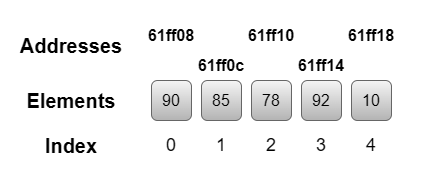
But how to access the data using the index number:
printf("%d", marks[0]); // 90Key characteristics of arrays
- Store multiple values under one name.
- All elements must be of the same data type.
- Stored in contiguous memory.
- Accessed using index (starting from 0).
Real-life analogy
Think of a row of lockers:
- Each locker has a number (index).
- Each locker stores one item (value).
You don’t name every locker — you use its number. That’s exactly how arrays work.
Why do we need arrays?
Working with single variables is not enough. Without arrays, you can not store multiple values in a single variable. You would need multiple variables, making the code harder to manage. But with arrays, all the values of the same data type can be stored in a single variable.
1. Efficient Data Storage
Store multiple values in a single variable instead of many separate ones.
int temperature[7]; // store 7 days data2. Easy data access using an index
Each element has a position (index) for direct access, which makes retrieval fast.
printf("%d", temperature[2]); 3. Work seamlessly with loops
Arrays work perfectly with loops. Without arrays, this would be impossible to do efficiently.
for(int i = 0; i < 5; i++) {
    printf("%d", marks[i]);
}4. Better memory management
Arrays use continuous memory, which improves performance.
5. Foundation for advanced concepts
Arrays are used in:
- Strings (a string in C is a char array)
- Data structures (stack, queue, hash tables)
- Matrices and linear algebra
- sorting and searching algorithms
Without arrays, advanced programming is impossible.
Array syntax in C (declaration, initialization & usage)
Understanding the arrays conceptually is important — but to actually use them in programs, you need to clearly understand their syntax. And the truth is, understanding why it is written that way is more important than memorizing array syntax. In this section, you wouldn’t just learn syntax — you’ll understand how and why arrays are declared, initialized, and used in real programs.
Syntax of an array
data_type variable_name[size];Basic array declaration
Let’s start with the most fundamental form:
int marks[5];The single line tells the compiler three important things:
- int -> the type of data the array will store.
- marks -> the name of the array.
- [5] -> the number of elements the array can hold.
You are telling C: reserve space in memory to store 5 integer values, and call it marks. In terms of memory, the compiler allocates continuous memory space for integers. Even if you don’t assign values immediately, memory is still reserved. This is important because:
- Array size must be known at compile time (in basic cases).
- Memory allocation happens before execution.
Array initialization (assigning values)
Declaring an array is just the first step. To make it useful, you need to store values inside it. There are different methods to initialize the array.
Method 1: Initialization at declaration
int marks[5] = {80, 75, 90, 60, 85};This is the most common and clean approach. Here:
- Declare the array.
- Assign values immediately.
Method 2: Partial Initialization
int marks[5] = {80, 75};Only the first two values are assigned, and the remaining elements automatically become 0.
Method 3: Size omitted (automatic size)
int marks[] = {80, 75, 90};The compiler automatically calculates the size (3 in this case). This is useful when:
- Values are known already.
- You don’t want to manually count size.
Assigning values later (using index)
Values can also be assigned after declaration:
int marks[3];
marks[0] = 80;
marks[1] = 75;
marks[2] = 90;Each element is accessed using its index. In C, arrays always start from index 0. This is one of the most important rules.
Accessing array elements and using arrays with loops
To read values:
printf("%d", marks[1]); Output
75Using arrays with loops makes arrays truly powerful. Instead of writing multiple print statements, you use a loop. This is why arrays are essential in real programming.
for(int i = 0; i < 5; i++) {
    printf("%d", marks[i]);
}Types of arrays in C programming
Before jumping into types, understand this:
- Arrays are not just about storing data.
- They are about organizing data in a meaningful way.
As the data becomes more complex, the structure of your array also evolves.
1-D array (Single-dimensional arrays)
A 1-D array is the simplest form of an array. It stores data in a linear sequence (one direction). Think of it like a straight line:
[ value1 ] [ value2 ] [ value3 ] [ value4 ] Conceptually, it is like:
- A list of student marks.
- A list of temperatures.
- A list of scores.
Data is arranged one after another, and you move through it using a single index. 1-D arrays are used to store marks of students, record daily expenses and track sensor readings.
Key insight
1-D arrays are perfect when:
- Data is simple.
- Data flows in one direction.
- No grouping or relationships are required.
2-D arrays (Two-dimensional arrays)
Used when the data is not just a list but a table. This is where 2-D arrays come in. A 2-D array stores data in rows and columns. Think of it like:
[ 80 75 90 ]
[ 60 50 65 ]
A 2-D array is basically an array of arrays. Each row is itself an array. 2-D arrays are used when data has relationships in two directions:
- Tabular data
- Game boards
- Matrix calculations
- Image processing
Multi-Dimensional arrays (beyond 2-D)
What if your data is not just a table…but something more complex? For example: Multiple classrooms -> each with multiple students -> each with multiple subjects. Think of it like layers:
Layer 1 -> Table
Layer 2 -> Another table
Layer 3 -> Another table
Stack of tables = multi-dimensional array
Usage
- 3-D graphics
- Scientific simulations
- Data modeling
- Game development
How arrays work in memory
If you don’t understand how arrays work in memory, you’re only learning surface-level programming. This section will take you deeper — into how arrays are actually stored and accessed inside the computer.
When an array is created, C does something very important: it allocates a block of continuous (adjacent) memory locations. This means:
- All elements are stored next to each other.
- There are no gaps between them.
Think of memory like a row of houses. Each address stores one element of the array. Let’s understand what happens internally when an array is created. Suppose you declare an integer of size 5. C will:
- Reserve memory for 5 integers.
- Place them in continuous locations.
Each element is stored with a fixed gap depending on its data type. If each integer takes 4 bytes. Then the memory layout looks like:
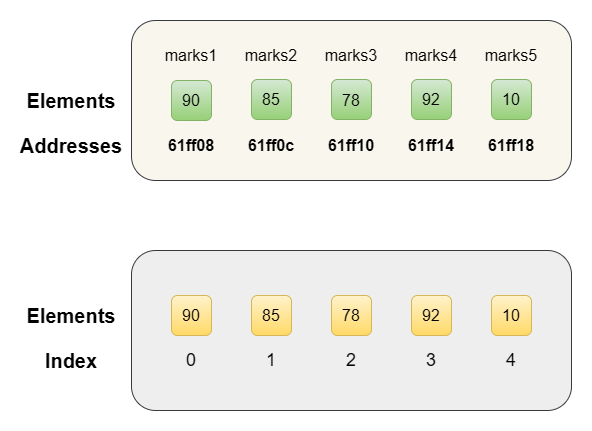
Array index is not just a number — it is used to calculate a memory location.
Formula (Conceptual understanding)
Address of element = Base Address + (Index * Size of data type)
This is how C accessed array elements instantly. Base understanding:
- Base address = starting point
- Index = position
- Size = data type size
Because of the continuous memory arrays are fast direct access (no searching required), constant time access -> O(1), efficient for large data. This is why arrays are used in high-performance programs, system-level programming and real-time applications.
Real-life examples of arrays in C programming
1. Student marks management system
Imagine a classroom where you need to store marks of multiple students. Instead of creating separate variables, arrays allow you to manage everything efficiently.
#include <stdio.h>

int main() {
  int marks[5];
  int sum = 0;

  printf("Enter marks of 5 students:\n");

  for(int i = 0; i < 5; i++) {
    scanf("%d", &marks[i]);
    sum += marks[i];
  }

  printf("Total Marks = %d\n", sum);
  printf("Average Marks = %.2f\n", sum / 5.0);


  return 0;
}Output
Enter marks of 5 students:
76 67 98 83 65 70
Total Marks = 389
Average Marks = 77.80
2. Weekly temperature monitoring system
Think about weather tracking. You need to store the temperature for each day of the week.
#include <stdio.h>

int main() {
    float temp[7];
    float max;

    printf("Enter temperature for 7 days:\n");

    for(int i = 0; i < 7; i++) {
        scanf("%f", &temp[i]);
    }

    max = temp[0];

    for(int i = 1; i < 7; i++) {
        if(temp[i] > max) {
            max = temp[i];
        }
    }

    printf("Highest Temperature = %.2f\n", max);

    return 0;
}Output
43 37 40.4 38.7 37.2 39.5 40.5
Highest Temperature = 43.00
3. Sensor data collection (real-time system)
In embedded systems, arrays are used to store multiple sensor readings.
#include <stdio.h>

int main() {
    int sensor[5] = {10, 20, 15, 25, 30};
    int sum = 0;

    for(int i = 0; i < 5; i++) {
        sum += sensor[i];
    }

    printf("Total Sensor Output = %d\n", sum);

    return 0;
}Output
Total Sensor Output = 1004. Searching data (basic database concept)
Arrays are also used to search for values.
#include <stdio.h>

int main() {
    int data[5] = {10, 20, 30, 40, 50};
    int key = 30;
    int found = 0;

    for(int i = 0; i < 5; i++) {
        if(data[i] == key) {
            found = 1;
            break;
        }
    }

    if(found)
        printf("Element Found\n");
    else
        printf("Element Not Found\n");

    return 0;
}Output
Element FoundArrays and pointers in C programming
Arrays and pointers are deeply connected. In C, the name of an array behaves like a pointer. More specifically, an array name represents the address of its first element.
int arr[3] = {10, 20, 30};Then:
- arr -> points to the first element
- &arr[0] -> also points to the first element
That means:
arr == &arr[0]This is the key idea.
How pointers access array elements
Using pointers, array elements can be accessed differently.
#include <stdio.h>

int main() {
    int arr[3] = {10, 20, 30};
    int *p = arr;

    printf("%d\n", *p);       // first element
    printf("%d\n", *(p + 1)); // second element
    printf("%d\n", *(p + 2)); // third element

    return 0;
}Here’s what’s happening:
- p points to the first element.
- p + 1 moves to the next memory location.
- * dereferences (gets value).
This relationship is used in:
- Function arguments (arrays passed as pointers).
- Dynamic memory allocation.
- Strings in C.
- Data structures.
Note: When you pass an array to a function, you are actually passing a pointer.
Arrays and pointers are related, but they are not exactly the same.
- Array -> fixed block of memory.
- Pointer -> variable that stores an address.
Common mistakes in arrays in C programming (and how to avoid them)
Arrays may look simple — but this is exactly where most beginners make mistakes. Not because arrays are difficult…but because small misunderstandings lead to big problems. Let’s go through the most common mistakes so you can avoid bugs and write clean, reliable code.
1. Accessing out-of-bounds index (most dangerous mistake)
One of the biggest mistakes is accessing memory outside the array.
int arr[5] = {10, 20, 30, 40, 50};
printf("%d", arr[5]); // WrongHere, the valid indexes are 0 to 4 and arr[5] does not exist. This is dangerous because it may print garbage value, may crash the program and cause undefined behaviour. To avoid this mistake, always the ensure index is within range.
2. Forgetting that the index starts from 0
Many people assume arrays start from 1. That’s incorrect.
int arr[3] = {10, 20, 30};arr[0] is the first element and arr[1] is the second element. This small mistake leads to wrong logic.
3. Declaring an array without size (when not initialized)
int arr[];  // Invalid

// correct
int arr[3];

// OR

int arr[] = {10, 20, 30};The compiler needs to know the size unless values are provided.
4. Using Uninitialized array values
int arr[3];
printf("%d", arr[0]); // Undefined valueValues are not automatically set (except for special cases). Always initialize before using.
5. Confusing the arrays size with the number of elements used
int arr[10];This does not mean all 10 elements are used. You must track how many elements are actually filled.
6. Misusing arrays with loops
for(int i = 0; i <= 5; i++) {
    printf("%d", arr[i]);  // wrong condition
}<= causes out-of-bounds access. The correct form is only using <.
7. Assuming arrays can grow automatically
In C, arrays are fixed in size. You can not add more elements beyond size. For dynamic behaviour -> you’ll later learn dynamic memory allocation.
int arr[5];8. Confusing arrays with pointers
Arrays and pointers are related — but not identical. Arrays are fixed memory blocks, pointer stores address. Misunderstanding this leads to bugs in advanced programs.
Advantages and limitations of arrays in C programming
Arrays are powerful — but like every concept in programming, they have both strengths and limitations. Understanding both sides helps you decide when to use arrays and when to use something better.
Advantages of arrays
1. Efficient data storage
Arrays allow storing multiple values in a single variable. This makes programs cleaner and easier to manage.
2. Fast access to elements
Because of continuous memory, access time is constant O(1). No need to search, access the elements directly.
3. Easy to use with loops
Arrays and loops work perfectly together. This allows iteration, data processing and automation.
4. Better memory organization
Memory is allocated in a structured way. This improves performance and cache efficiency.
5. Foundation for advanced concepts
Arrays are used in strings, data structures, algorithms and matrices. Without arrays, advanced programming is impossible.
Limitations of arrays
1. Fixed size
Once declared, size can not change. This is a major limitation.
2. Wastage of memory
If you declare:
int arr[100];But use only 10 elements -> remaining memory is wasted.
3. No bound checking
C does not check array limits. This makes arrays fast but risky.
4. Only the same data type
Arrays can store only one type of data. Can not mix int + float + char.
5. Insertion and deletion are difficult
Not efficient for dynamic operations. You need to manually shift elements.
Understanding the advantages and limitations of arrays in C programming helps you choose the right data structure for efficient and scalable applications.
Conclusion
Arrays are a turning point in C programming. Before arrays, you wrote small programs that handled one variable at a time. After arrays, you can process real data hundreds of values, complex tables, sensor streams, game boards — with clean, efficient code. This is where programming stops being theoretical and starts becoming practical. Arrays introduce a new way of thinking, not just “how to write code” but “how to organize and manage data”. And this idea is the foundation of:
- Strings
- Data structures (stack, queue).
- Algorithm
- Real-world systems
Now that you understand 1-D arrays, the logical next step is 2-D arrays — where data is organized in rows and columns, like a spreadsheet or game board. You’ll learn matrix operations, nested loops, and how multi-dimensional arrays are laid out in memory.
This is where 2-D arrays come in. In the next article, you will learn:
- How to work with rows and columns.
- How to represent tables and grids.
- How memory works in multi-dimensional arrays.
- Real-world problems like matrix operations and game logic.

[…] Arrays in C Programming: Complete Guide with Examples (2026 Guide) […]