

Understanding the structure of C program
Introduction
In the previous tutorial, we wrote our very first C program. When we ran it, the computer printed a simple message on the screen. But if you look closely at the program, you will notice several unfamiliar things:
- // comments
- #include
- int main()
- printf()
- ; semicolon and return 0
At first, they may look like strange symbols placed randomly in the program. But every one of them has a specific purpose. So what would happen if we removed one of them? Why are these required? What happens if we remove one of them? Would the program still work? In this article, we will take apart our first C program and understand what each line is really doing.
In this guide
- Program structure
- How the program actually runs
- Common beginner confusion
- Experiment
The program we saw earlier
// This is my first C program

#include <stdio.h>

int main() {
    printf("Hello! Embediax");
    return 0;
}
At first glance, this may look like just a few lines of text. However, to the computer, this is a set of instructions arranged in a very specific structure. If the structure is wrong, the program will not run. Let’s explore each piece.
Comments
Before writing real programs, programmers often add comments to explain their code. A comment is simply a note written for humans reading the code. The compiler ignores it completely.
// This is my first C programComments can help make programs easier to understand.
#include <stdio.h>
#include <stdio.h>The very first line begins with the # symbol. This indicates a preprocessor directive. Before the program is compiled, a component called the preprocessor processes these directives. The directive #include tells the compiler to include another file before compilation begins.
stdio.h is the header file that contains declarations for standard input and standard output functions. Functions such as:
- printf()
- scanf()
Without including this header file, the compiler would not know what printf() means. The .h extension indicates that it is a header file. The angle brackets < > tell the compiler to search for this file in the system’s predefined include directories, which usually contain the standard library headers.
main()
int main()Every C program must have a main function. The program always starts executing from here. You can think of main() as the entry point of the program. When the operating system runs a program, it looks for the main() function and begins execution there. If it is missing, the compiler would not be able to run the program.
Why int?
The int keyword indicates that the function returns an integer value. At the end of the program, we usually write:
return 0;This value is returned to the operating system (OS) or calling process (example, command shell or a script). The syntax of the function is,
return_type function_name(parameter_type parameter1, ...)The parentheses () indicate that main is a function. When left empty, it technically means that the function can accept an indeterminate number of arguments, void means no arguments. In the beginner programs, we usually leave them empty because we are not passing any arguments to the function.
Curly braces { } define the body of a function. Everything written inside these braces belongs to the main() function. When the program runs, the computer executes the statements inside these braces.
printf()
printf("Hello! Embediax");printf() is a function used to display text on the screen. It is part of the C standard library, which is why we include <stdio.h> at the beginning of the program. The text we want to display must be written inside the double quotation marks. For example:
printf("Welcome to Embediax");Semicolon
Notice the semicolon ; at the end of the line. In C, the semicolon marks the end of a statement. It tells the compiler where one instruction ends and the next one begins. Without the semicolon, the compiler cannot determine where one statement ends and the next one begins.
The return statement
return 0;This statement appears at the end of main() function. It sends a value back to the operating system indicating that the program finished execution.
- 0 -> program executed successfully
- Non-zero value -> indicates some error
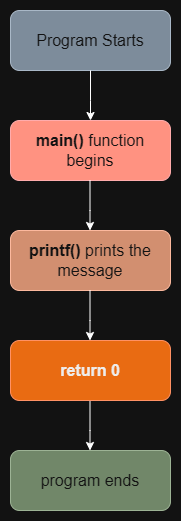
How the program actually runs
The program executes in the following order:
Common beginner Confusion
Many beginners mix up header files and C standard library.
Header file
A header file contains function declarations. It tells the compiler which functions exist.
C standard library
The C standard library contains the actual implementations of those functions. For example, the real code that performs the printing is part of the standard library.
Try these experiments
To understand how the program works, try modifying it.
- Remove the semicolon ; after printf()
- Remove the #include
- Change the text inside the printf()
Compile the program each time and observe what happens. These small experiments help you understand how strict programming languages can be.
One important question remains
Now that we understand the structure of a program, another question appears. We wrote this program as simple text in a file. But computers do not understand plain text. So, how does this text become a program that the computer can actually execute? What transforms C code into machine instructions?
In the next article, we will explore how a C program transforms from source code into an executable.
