

How C Program Actually Runs Inside Computer
Introduction
Have you ever wondered what really happens when you run a C program? You write a few lines of code, click “Run” and instantly see the output on your screen. It feels almost magical – but in reality, your computer is performing a series of well-defined steps behind the scenes.
One more thing to understand: Computers do not understand C. Now the question arises, what does a computer understand? The answer is they only understand bits (0s and 1s).
So, how does C code convert into the bits or machine-readable code? To convert this C code to machine code, we need a compiler. One of the most important compilers is the ‘GNU Compiler Collection’ or gcc; it is completely free. To download the compiler onto our computer, follow the steps in the article Setting Up C Programming Environment: GCC, IDE and Editors Explained (https://embediax.com/setting-up-c-programming-environment-gcc-ide-and-editors-explained/)
In the guide, we will follow the complete journey of a C program – from the moment you write it to the moment it runs inside the CPU.
In this guide, you will learn
- What happens after writing a C program
- The complete execution process
- Step-by-step execution flow
- What happens behind the scenes
- Common beginner mistakes
- Conclusion
The big picture
Before diving into details, let’s look at the overall flow:
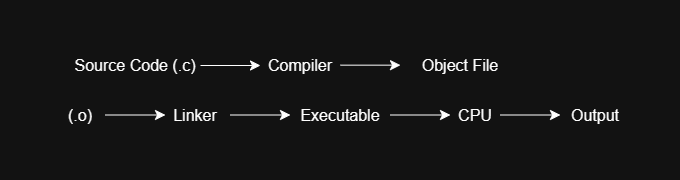
Think of this process like translating a language.
- You write in C (human-readable).
- The computer understands machine language.
- The compiler acts as a translator.
Step-by-step execution flow
Step 1: Writing the source code
A C program is simply written in text instructions in a file. This file is called as a source code and usually has a .c extension. Example:
// This is my first C program

#include <stdio.h>

int main() {
    printf("Hello! Embediax");
    return 0;
}
At this stage, this code is not executable. It’s just plain text.
Step 2: Compilation (where the magic begins)
Now comes the most crucial step – compilation. This is the core concept. A compiler is a special program that converts C code into machine-understandable instructions. GCC is the most commonly used compiler.
2.1 Pre-processing
The pre-processor handles the lines that begin with #, such as #include and #define, before the compilation begins. It does not compile the code. Instead, it prepares the code for compilation.
#include <stdio.h>It replaces them with the actual content needed for the program.
2.2 Compilation
Next is the compiler:
- Checks for the syntax errors
- Converts the code into a lower-level form
If there are mistakes, this is where errors occur.

2.3 Object file creation
Once the compilation process is done successfully, the compiler creates the object file (.o). This file contains the machine-level instructions, but it is not yet ready to run.
gcc myFirstProgram.c -o myFirstProgram
./myFirstProgram
This command compiles the program and creates an executable file.
- gcc myFirstProgram.c -> compiles the C source file
- -o myFirstProgram -> creates an executable file named myFirstProgram
- ./myFirstProgram -> runs the compiled program
Step 3: Linking (connecting everything)
Now comes an important step that beginners often miss – linking. C program uses functions like printf().
printf()But where is printf() actually defined? It exists in external libraries. The linker connects the object file with these libraries and creates the final executable file.
Step 4: Execution
Now the C program is finally ready, and the file is an executable file. When the code runs, the operating system loads the program into memory, and the CPU begins executing instructions starting from the main() function.
- The operating system loads it into memory.
- The CPU starts executing instructions.
- The output appears on the screen.
Example output:
Hello! EmbediaxWhat happens behind the scenes?
To truly understand the process, let’s peek behind the scenes of what happens during execution. When “Run” is clicked, the system:
- Processes code
- Converts it into machine instructions
- Links required libraries
- Executes it through the CPU
All of these steps happen in a fraction of a second. While it feels instant, your system is performing multiple transformations – from text to machine code – before executing the program. Thousands of operations happen instantly – without you even noticing.
Common beginner confusion
Many beginners think that C code runs directly. But that’s not true. C must always go through compilation first before execution.
Small Experiment
To understand this better, try:
- Save your program as myFirstProgram.c
- Compile it manually using a compiler.
- Observe the files created.
You will notice:
- Intermediate steps
- Object files
- Final executable
This helps you understand what IDEs usually hide.
Conclusion
In this article, we explored how a C program moves from source code to execution. You learned how compilation, preprocessing, linking, and execution work together to run your program. Understanding this process is important because it helps you debug errors and write better programs.
But as programs grow larger, writing everything inside one file becomes difficult. So how do programmers organise large programs?
In the next article, we will explore variables and data types in C, which allow programs to store and manipulate information.
