

Loops in C Programming (With Example) – while, for, do-while Explained Clearly
A program becomes powerful when it can repeat tasks efficiently. Imagine printing numbers from 1 to 100 or processing thousands of records — writing each step manually would be impossible. This is where loops in C programming become essential.
#include <stdio.h>

int main() {
  printf("1\n");
  printf("2\n");
  printf("3\n");
  printf("4\n");
  .
  .
  .
  .
  printf("100\n");

  return 0;
}Output
1
2
3
4
.
.
.
.
100
Instead of writing hundreds or thousands of lines manually, loops allow you to solve this problem with just a few lines of code. This is why loops are one of the most powerful concepts in the C programming language. They help you write programs that are:
- Efficient
- Scalable
- Easy to maintain
#include <stdio.h>

int main() {
  for(int i=1; i<=100; i++)         // repeat the block until reach to 100
  {
    printf("%d\n", i);              // print the numbers upto 100
  }

  return 0;
}The program above to print numbers from 1 to 100 looks more practical, easier and clean than the program we have written before. So far, we have learned the sequential or decision control instructions. In sequential instructions, the calculations are carried out in the sequence or in the fixed order, while in decision control instructions, the calculations are carried out based on the outcome of the conditions being tested.
This guide will help you master loops step-by-step with real-life examples and practical programs. In this complete guide, you will learn:
- What loops are in C
- Types of loops in C
- Real-world examples
- Nesting loops, infinite loops and common mistakes
- Best practices for using loops
What loops are in C programming?
A loop allows a program to run the same set of instructions multiple times based on a condition. In simple terms, loops help automate repetitive tasks in programming.
Why are loops used in C?
Loops are used to:
- Avoid writing repetitive code.
- Improve program efficiency.
- Handle large-scale data processing.
- Build real-world applications like menus, games and automation systems.
Types of loops in C
There are three main loops in C programming that are used to repeat the block of code until the condition is met.
- while loop
- for loop
- do-while loop
1. while loop in C
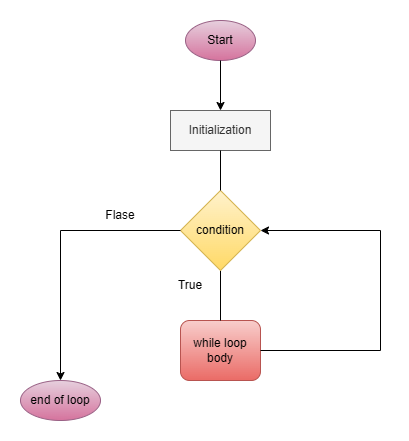
It is the type of loop that we want to repeat something for an unknown number of times, and the condition is checked before entering the loop.
Syntax
while(condition) {
    Statement 1;              // code to execute until the condition met
    Statement 2;
}
How it works
At first, the condition written in the while loop is checked first. If this condition evaluates to TRUE, then the statements inside the body of the while loop will execute, after which the value increases or decreases whatever you want. If the condition evaluates to FALSE, then we exit the loop.
Example: In the code below, the code in the loop will run, over and over again, until and count the steps of walking.
#include <stdio.h>

int main() {
  int steps = 0;

  while(steps < 10000) {
    steps++;                        // increase the steps by one
  }

  printf("Goal reached: %d steps\n", steps);

  return 0;
}Output
Goal reached: 10000 stepsNote: In the above example, the loop starts counting the steps from 0 and increases the steps one by one until the condition is TRUE, once the steps reached 10,000, the loop will end, and it will print the statement immediately after the while loop and execute the printf statement.
When to use a while loop in C
- When the number of iterations is unknown.
- When the condition depends on user input.
2. for loop in C
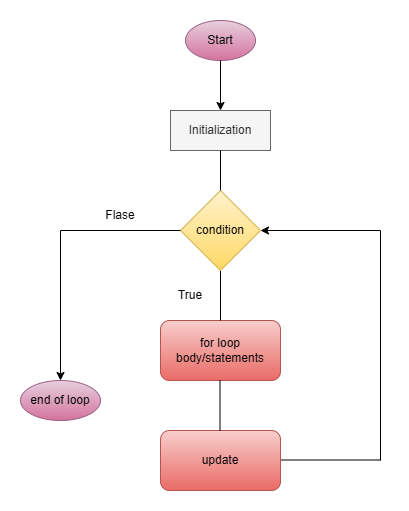
It is also the entry-controlled loop; the condition is checked before entering the loop. This loop repeats the code inside the body of the loop, but it is a little different from the while loop. The for loop allows us to specify three things about a loop in a single line:
- Setting the loop counter to an initial value.
- Testing the loop counter, it checks whether the condition is TRUE or FALSE.
- Increase or decrease the value of the loop.
Syntax
for(initialization; condition; increment/decrement) {
    Statement 1;              // code to execute until the condition met
    Statement 2;
}
How it works
First, the value in the for loop initialize the condition checked, and if the condition is evaluated to TRUE, the statements inside the for loop will get executed, then the value is increased/decreased, and the condition is checked again. This repeats until the condition becomes FALSE. Let’s understand this with a real-life example.
Example: Printing salary for 12 months.
#include <stdio.h>

int main() {
  int month;

  for(month = 1; month <= 12; month++) {
    printf("Salary credited for month %d\n", month);      // it will execute only when the condition is TRUE
  }

  return 0;
}Output
Salary credited for month 1
Salary credited for month 2
Salary credited for month 3
Salary credited for month 4
Salary credited for month 5
Salary credited for month 6
Salary credited for month 7
Salary credited for month 8
Salary credited for month 9
Salary credited for month 10
Salary credited for month 11
Salary credited for month 12
When to use for loop in C
- When the number of iterations is known.
- Ideal for counting and indexing.
Multiple initialization in the for loop
The initialization, condition or the increment/decrement expressions in the for loop can contain more than one statement. These statements can be separated by a comma.
Syntax
for(e = 1, x = 5; e<=5; e++) {
    Statement 1;              // code to execute until the condition met
    Statement 2;
}
Multiple conditions are allowed in the test expression, and these conditions must be linked together using logical operators && and/or ||.
3. do-while loop in C
This loop is a little different from the while loop. The difference is in the condition tested. The while loop tests the condition before executing any statements. As against this, the do-while loop tests the condition after executing the statements within the loop. This means the do-while loop would execute the statement at least once, even if the condition is FALSE for the first time. The while loop will not execute the statement if the condition is FALSE.
Syntax
do {
    // body of do-while loop
    Statement 1;
    Statement 2;
} while(condition);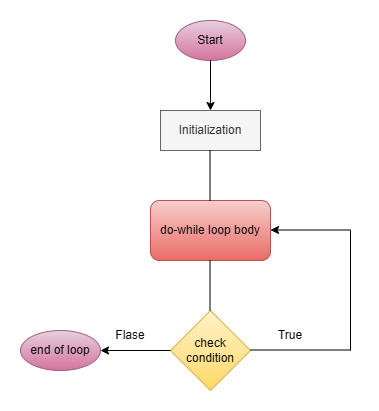
How it works
In do-while loop, the body of the loop runs first, then the condition is checked, because of this, the code or the body of the loop executes at least once.
Example: Menu system that should run at least once. Here in the example, the code will run until we enter 2 (for exit the code).
#include <stdio.h>

int main() {
  int choice;

  do {
    printf("\n1. Play Game\n2. Exit\n");      // it will execute only when the condition is TRUE
    printf("Enter choice: ");
    scanf("%d", &choice);
  } while(choice != 2);

  return 0;
}Output
1. Play Game
2. Exit
Enter choice: 1

1. Play Game
2. Exit
Enter choice: 1

1. Play Game
2. Exit
Enter choice: 2
When to use do-while loop
- When code must run at least once.
- Menu-driven programs.
Nesting of loops
For loop can be nested in the same way as the if statements; similarly, whiles and fors can also be nested.
Syntax
for(initialization; condition; increment/decrement)   // outer loop
{
    for(initialization; condition; increment/decrement)   // inner loop
    {
        Statement 1;              // code to execute until the condition is met
        Statement 2;
    }
}
For each value of outer value, the inner loop is cycled until the condition becomes FALSE, and the outer loop will execute again. These multiple indentations make the program easier to understand. The way for loops has been nested here; similarly, two while loops can also be nested. A while loop can occur inside the for loop, or the for loop can occur inside the while loop. Also, we can do nesting with do-while loop as well.
Infinite loop in C
A loop that never ends due to always-true condition. A program enters an infinite loop when the condition always remains TRUE. Most of the time, this is an error that can be resolved by using loop control statements. Infinite loops are not always errors — they are intentionally used in systems that must run continuously.
- Operating systems, system keeps running continuously.
- Game development.
- Servers, run continuously, waiting for requests.
- Embedded systems, devices like ATM, washing machines.
Example: Here are some examples of infinite loops
- Basic infinite loop
#include <stdio.h>

int main() {
  while(1) {
    printf("the runs forever\n");
  }

  return 0;
}2. Mistake-based infinite loop
#include <stdio.h>

int main() {
  int e = 1;

  while(e <= 5) {
    printf("%d\n", e);
    // missing e++, leading to infinite loop by mistake
  }

  return 0;
}3. for loop infinite, for( ; ; ) is a classic infinite loop syntax.
#include <stdio.h>

int main() {
  for(; ;) {
    printf("Infinite loop\n");
  }

  return 0;
}How to stop an infinite loop
Using break, we can stop the infinite loop.
#include <stdio.h>

int main() {
  int e = 1;

  while(1) {
    printf("%d\n", e);
    if(e == 5) {
      break;
    }
    e++;
  }

  return 0;
}How to avoid infinite loop
- Always update loop variable.
- Check the condition carefully.
- Use debug prints.
- Avoid logical mistakes.
When to use each loop in C (quick guide)
- Use for loop when the number of iterations is known.
- Use while loop when the condition depends on external input.
- Use do-while loop when the code must execute at least once.
Difference between while, for, and do-while loop
| Feature | while loop | for loop | do-while loop |
| Condition check | Before execution | Before execution | After execution |
| Execution | May skip | May skip | Runs at least once |
| Best use case | Unknown iterations | Known iterations | Menu-driven programs |
Real-world use of loops in C
Loops are used everywhere:
- ATM machines
- Login systems
- Games (levels, scores)
- Data processing
- Automation scripts
Best practices for using loops
- Avoid infinite loops.
- Keep conditions clear.
- Use meaningful variables.
- Choose the right loop type.
- Optimize nested loops.
Common mistakes to avoid
- Infinite loop (while(1)) accidentally.
- Forgetting increment/decrement.
- Wrong condition logic.
- Using the wrong loop type.
Common interview questions on loops in C
- What is the difference between while loop and do-while loop?
- When should you use a for loop?
- What is an infinite loop in C?
- How do you stop an infinite loop?
- Can we use multiple variables in a for loop?
Conclusion
Loops are one of the most powerful features in C programming. They allow you to automate repetitive tasks, process large amounts of data, and build efficient real-world applications. By mastering:
- while loop
- for loop
- do-while loop
Loops, combined with operators and control statements, form the core foundation of programming logic. You can write efficient, scalable, and real-world programs. To make your loop-based programs reusable, let’s learn functions in C programming. In the next article we will explore functions in details.

[…] Loops in C Programming (Complete Guide with While, For and Do-While With Examples) […]