

Control Statements in C Programming: A Complete Guide with Examples
Every program we write needs the ability to make decisions — just like humans choose actions based on conditions, programs also need logic to choose what to do next. That’s where control statements in C programming come into play.
Whether you are:
- A beginner learning C
- A student preparing for exams
- An aspiring developer building logic
This guide will help you master control statements step-by-step with simple + advanced examples, real-life explanations, and best practices.
But here’s the real turning point: How does a program decide what to do? A program without decisions is just a calculator because real-world programs don’t behave the same way every time.
- Sometimes they accept.
- Sometimes they reject it.
- Sometimes they execute one path.
- Sometimes a completely different one.
This behaviour is controlled using control statements.
Until now, we’ve learned:
- How to store data (variables)
- What kind of data exists (data types)
- How to perform operations (operators)
What are control statements in C?
As the name suggests, the control statements are instructions that control the flow of execution in a program based on conditions. They decide:
- Which statements run
- When it runs
- Under what condition does it run
In simple words, control statements determine the flow of control in a program.
Types of control instructions in C
C provides four major types of control instructions.
1. Sequence control instruction
This is the default behaviour of any program. Instructions are executed in the same order as written. We don’t need to write anything special — this happens automatically.
Step 1 -> Step 2 -> Step 3 -> Step 4 -> Step 52. Selection / decision control instruction
This allows the program to make decisions. Execute different code based on conditions. Implemented using:
- if
- if-else
- if-else-if
- conditional (ternary) operator
3. Repetition / loop control instruction
This allows repeating instructions. Execute the same block multiple times. (Explore this in the next article).
4. Case control instruction
Used for handling multiple fixed choices. Implemented using:
- switch statement
Why control statements in C are important
In real programming:
We want to do X in some cases
We want to do Y in other cases
Without control statements:
- Programs cannot make decisions.
- Logic cannot be implemented.
- Behavior cannot change dynamically.
They are essential for:
- Real-world applications
- User-based logic
- Intelligent systems
Programs must:
- Check data
- Evaluate conditions
- Choose actions
This ability is called decision-making.
Types of control statements in C
C provides two main ways to make decisions:
- if (and its variations)
- switch statement
1. if statement in C (basic decision-making)
C uses the if keyword to implement the basic decision control instruction. Executes code only when a condition is true; if the condition is not true, then the statement is not executed and moves to the next block. if control instruction is used when there is only a single condition to check. As we know, a non-zero value is considered to true in C, so in an if instruction, the expression should evaluate to a non-zero to be executed.. The syntax of an if statement looks like:
Syntax
if(condition)                         // if this condition is true, then enter inside the block
{
    execute this statement;           // code to execute if condition is true
}
Concept
If condition is true -> execute block.
If the condition is false -> skip block.
Use case
- Check eligibility
- Validating input
- Simple decisions
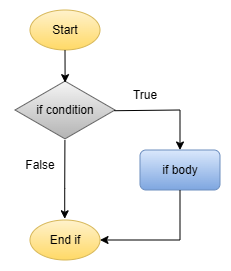
Example: When the user enters the password to log in to websites, apps or banking systems.
#include <stdio.h>

int main() {
  int password = 1234;

  if(password == 1234) {
    printf("Login successful\n");
  }

  return 0;
}Output
Login successfulNote: If there is a single statement in the if body, { } braces can be omitted. Multiple statements without braces will be included only in the first statement inside the if condition; other statements will run as normal. The condition should always be inside the parentheses ( ) and statements inside { } braces.
Common mistakes
- Missing parentheses ( )
- Using = instead of ==
2. if-else statement in C (two-way decision)
The if statement executes the single statement or a group of statements only if the expression evaluates to true. It does nothing when the expression evaluates to false. This is the purpose of the else statement, used when there are two possible outcomes.
Syntax
if(condition) {
    // code to execute if condition is true
}
else {
    // code to execute if condition is false
}
Concept
If condition is true -> run one block.
Else -> run another block.
Use case
- Pass or fail
- Login success or failure
- even or odd
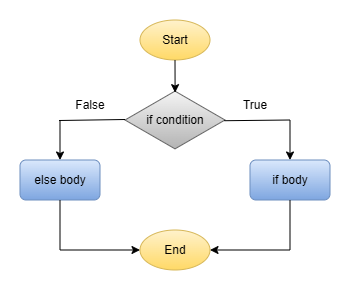
Example: When the user enters the password to log in the websites, apps or banking systems. Either it logs in successfully or shows an error.
#include <stdio.h>

int main() {
  int password = 1234;

  if(password == 1236) {
    printf("Login successful\n");
  }
  else {
    printf("The password you entered is incorrect\n");
  }

  return 0;
}Output
The password you entered is incorrectIn this case, the else body is executed because the password did not match, and the expression inside the if evaluates to false. Statements inside the { } braces are the body of that condition.
Note: The else should be written exactly below the if. Both if and else blocks can execute a single statement or a group of statements.
3. if-else-if ladder in C (multiple conditions)
Used when there are multiple conditions to check.
Syntax
if(condition 1) {
    // block 1
}
else if(condition 2) {
    // block 2
}
else {
    // default block
}
Concept
- Check condition 1
- Else check condition 2
- Else check condition 3
- Else default case
Use case
- Grading system in schools
- Menu selection
- Category classification
- Online test platforms
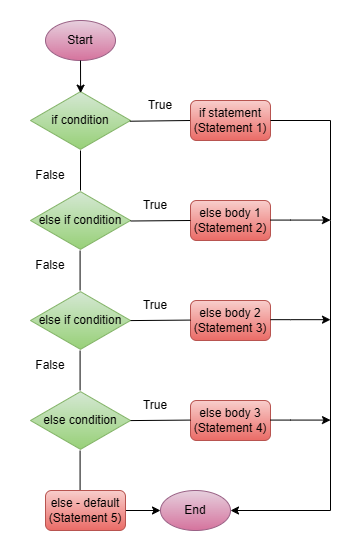
Example: Students marks determine the grade. If student get more than 90 marks, the Grade is A, and if the marks are more than or equal to 80, Grade is B, and if marks more than and equal to 65, Grade is C, and if marks are more than and equal to 50, Grade is D. Otherwise Fail (if the student get less than 50 marks).
#include <stdio.h>

int main() {
  int marks = 67;

  if(marks >= 90) {
    printf("Grade A\n");
  }
  else if(marks >= 80) {
    printf("Grade B\n");
  }
  else if(marks >= 65) {
    printf("Grade C\n");
  }
  else if(marks >= 50) {
    printf("Grade D\n");
  }
  else {
    printf("Fail\n");
  }

  return 0;
}Output
Grade CExplanation
Conditions are checked one by one. In the program above, marks are being checked in the if condition first, and it is not TRUE, so the compiler checks the next condition, else if, which is marks more than or equal to 80. This condition is also FALSE, so the statements inside the first else if condition did not execute. And the second else if condition checked, and this time the condition is TRUE, and the statements inside the body of the if, this else if executed and printed Grade C.
Suppose if none of the conditions is TRUE, i.e., marks are less than 50, then the default condition is executed, which is else at the last of the if-else-if ladder and, FAIL would be printed.
Note: If the first if condition were TRUE, then the first statement would be printed, and the program would have been finished, and no other conditions would be checked. Conditions are checked top to bottom. First TRUE condition executes.
4. Nested if in C(decision inside decision)
It sounds confusing, how can a decision inside a decision, a nested if, be a if statement inside another if statement?. In simple terms, nested if is the entire if-else construct, either the body of the if statement or the body of an else statement. Used for complex conditions.
Syntax
if(condition 1) {
    // block 1
    if(condition 2) {
        // block 2
    }
}
Concept
If condition 1 is true, then check condition 2. This creates multi-level decision-making in C programming.
Use case
- Advanced validations
- Permission systems
- Hierarchical conditions
- banking machines
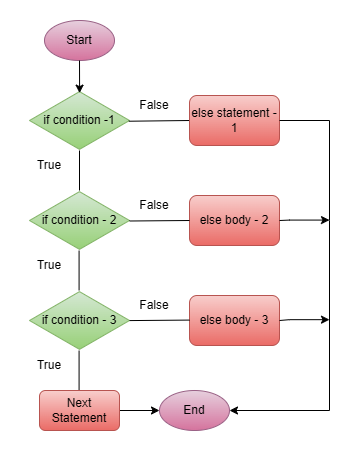
Example: ATM withdrawal system, when we want to withdraw money from the ATM.
#include <stdio.h>

int main() {
  int password = 1234, card = 1, balance = 6340, withdrawal_amount = 3000;

  if(card == 1) {
    if(password == 1234) {

	  if((balance >= 1000) && (withdrawal_amount < balance)) {
          printf("Access granted\n");
        }
		else {
			printf("Insufficient balance\n");
		}
	}
	else {
		printf("Incorrect password\n");
	}
  }
  else {
	printf("Invalid Card\n");
  }

  return 0;
}Output
Access granted5. Switch statement in C (multiple fixed choices)
It is an alternative of if else if ladder; it can be used to execute the conditional code based on the value of the variable specified in the switch. It is an efficient way to handle multiple conditions. Use when the variable has fixed values.
Syntax
switch(expression) {
    case value1:
        // code
        break;
    case value2:
        // code
        break;
    default:
        // default code
}
Concept
Match the value with cases, execute the matched case. Switch case works best with:
- Fixed options
- Menu-driven programs
- Constants values
- E-commerce platforms
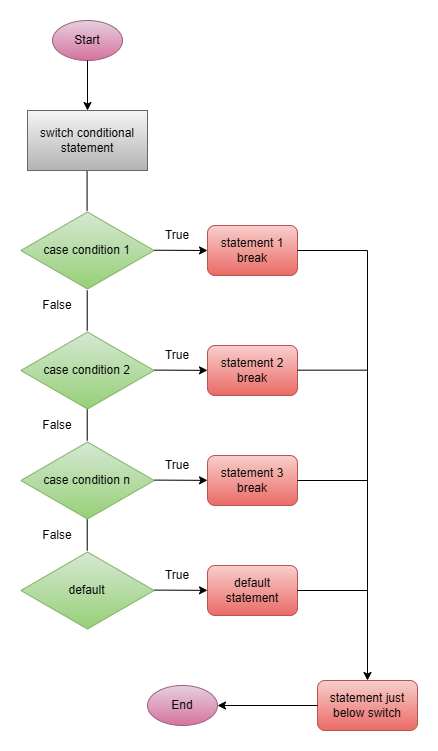
Example: We see the traffic light each day in our life, have you ever thought about how the light changes from red, yellow and green? A traffic light is the best example of a switch case.
#include <stdio.h>

int main() {
    char light;

    printf("Enter the light colour (r = red, y = yellow, g = green): ");
    scanf("%c", &light);

    switch(light) {
      case 'R':
      case 'r':        // multiple cases can execute at the same block
        printf("Stop\n");
        break;

      case 'G':
      case 'g':
        printf("Go\n");
        break;

      case 'Y':
      case 'y':
        printf("Wait\n");
        break;

      default:        // if no cases match
        printf("Invalid colour entered");
    }

    return 0;
}Output
Enter the light colour (r = red, y = yellow, g = green): y
Wait
Note: The variable being tested in switch must be an integer or character type. The switch expression is evaluated once, and the value is compared with the value of each case until matched with one, and the statements associated with that case will be executed. Use break in every case to stop execution of the switch block; otherwise, all the statements after the case matched with the expression will be executed. If no case match, then only the default statement will be executed.
6. Conditional operator in C (ternary operator)
A short and compact way to write simple conditions. Used to take quick decision in a single line. The conditional operator’s benefit is that it shortens the code and improves the readability of the code if the condition is simple. It is not useful for complex conditions, and we should not use it in complex conditions.
Syntax
(condition) ? expression1 : expression2;Concept
condition ? espression1 : expression2
It replaces the simple if-else statements.
Use case
- Quick decision
- Cleaner code for simple logic
- Billing systems
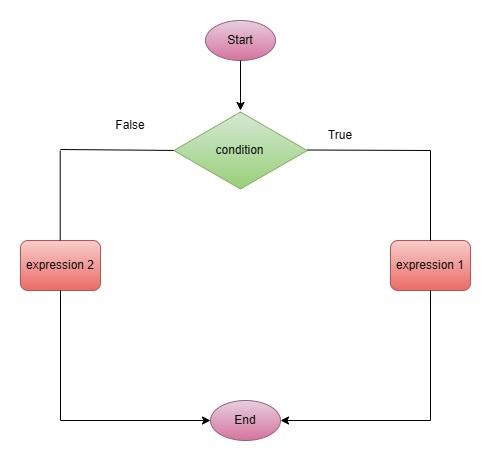
Example: Let’s try to find the maximum number between two numbers.
#include <stdio.h>

int main() {
  int number_1 = 10, number_2 = 11, maximum;

  maximum = (number_1 > number_2) ? number_1 : number_2;
  printf("the maximum number is %d\n", maximum);

  return 0;
}Output
the maximum number is 11Comparison table of control statements
| Statements | Best use case | Readability | Performance |
| if | Single condition | High | Fast |
| if-else | Two choices | High | Fast |
| if-else-if ladder | Multiple choices | Medium | Medium |
| nested if | Complex logic | Low | Medium |
| switch | Fixed values | High | Faster |
| ternary | Short conditions | High | Fast |
Best practices for using control statements
- Keep conditions simple and clear.
- Avoid deep nesting.
- Use a switch for menus.
- Use ternary for small checks.
- Always use proper indentation.
Common mistakes
Incorrect conditions
Using = instead of ==, wrong logic leads to the incorrect output.
if(a = 5) // this is wrongMissing braces
Not using braces { }, can cause unexpected execution.
if(a > 5)
  printf("E");
printf("X"); // this statement always runsOverusing nested if
Too many nested conditions make the code:
- Hard to read
- Hard to debug
Using switch for complex logic
Missing break in switch. Switch is not suitable for:
- Complex conditions
- Ranges
Conclusion
Control statements are the backbone of decision-making in C programming. Mastering control statements is a major step toward thinking like a real programmer. By mastering:
- if
- if-else
- else-if ladder
- nested if
- switch
- ternary operator
You can build powerful, logical and efficient programs. If operators allow you to perform actions, control statements allow you to decide those actions and adapt to different situations. This is where programming becomes intelligent and dynamic.
Now that your program can:
- store data
- perform operations
- make decisions
In the next article, we will explore loops in C (while, for, do-while) and understand how programs repeat tasks and automate execution. This will allow your program to:
- repeat tasks
- automate processes
- become more powerful

[…] Control Statements in C with Examples: A Complete Guide to Decision Making (if, else, switch Explain… […]
[…] Control Statements in C with Examples: A Complete Guide to Decision Making (if, else, switch Explain… […]