

Pointers in C Programming (Complete Guide with Real-Life Examples)
Up to this point, the C programming journey has been about building logic step by step.
- Learned how to make decisions using control statements.
- Learned how to repeat tasks efficiently using loops.
- Learned how to organize code into reusable blocks using functions.
And that’s exactly how most beginners write programs. But here’s the turning point … until now, you’ve been working with values. From this point forward, you’ll start working with memory itself.
This shift is what separates basic programmers from those who truly understand how programs work behind the scenes. In real-world applications — such as operating systems, game engines, embedded systems, or high-performance software — relying solely on variables is not enough. Programs need to:
- Update the original data directly.
- Handle large amounts of information efficiently.
- Interact closely with system memory.
This is where pointers in C programming come in. Pointers give you the ability to access, control, and manipulate memory directly. Instead of just storing and passing values, you start working with addresses, which opens the door to more powerful and efficient programming techniques.
Many learners struggle with pointers — not because the concept is too advanced, but because it’s often explained without proper intuition. When you understand why pointers exist and how they relate to memory, everything starts to make sense.
In this complete guide, you won’t just learn pointer syntax — you’ll build a clear mental model of how memory works, how pointers interact with variables, and how they are used in real-world scenarios. By the end of this article, pointers won’t feel confusing or intimidating — they’ll feel like a natural extension of everything you’ve already learned.
To get the most out of this guide, make sure you’re comfortable with:
Control statements in C programming: Control Statements in C with Examples: A Complete Guide to Decision Making (if, else, switch Explained)
Loops in C programming Loops in C Programming (Complete Guide with While, For and Do-While With Examples)
Functions in C programming Learn Functions in C with Real-Life Coding Examples (2026 Guide)
These concepts are from the foundation that pointers build upon.
What is pointer in C programming
At its core, a pointer is not just another variable — it’s a direct link to memory. In C programming, a pointer is defined as: A variable that stores the memory address of another variable. But to truly understand pointers, you need to shift your thinking slightly. Until now, you’ve been working like this:
- Store values
- Pass values
- Modify values
With pointers, you move one level deeper:
- Access where the value is stored.
- Work with its location.
- Control it directly.
This is what makes pointers powerful — and essential in C. Let’s start with something familiar.
#include <stdio.h>

int main() {
  int e = 10;          // normal variable
  int *ptr = &e;       // pointer stores address of e

  printf("value of e: %d\n", e);
  printf("address of e: %d\n", ptr);

  return 0;
}Output
value of e: 10
address of e: 6422300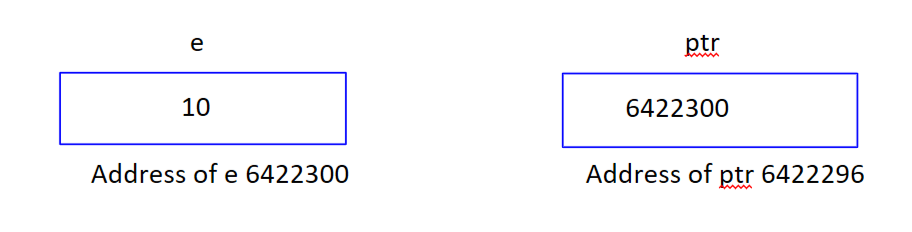
Here, the normal variable “e” stores the value 10, and the system automatically assigns it a memory location (address). In the pointer, “ptr” is the pointer and stores the address of variable “e” using the “&e” address-of-operator, so “ptr” stores the memory address of “e”, not any value. So instead of accessing the data directly, access it indirectly through its address. Now the question is how we can access the value using pointer; this is really important to understand.
#include <stdio.h>

int main() {
  int e = 10;          // normal variable

  int *ptr = &e;       // pointer variable

  printf("value of e: %d\n", e);
  printf("address of e: %d\n", ptr);

  printf("value stored at variable e: %d\n", *ptr);

  return 0;
}Output
value of e: 10
address of e: 6422300
value stored at variable e: 10
Once the pointer stores an address, the value can be accessed using the “*” operator. “ptr” gives the address and “*ptr” gives the value stored at that address.
Note: A pointer is not just store addresses, it is a way to reach and control a variable through its memory location.
Real-life analogy
Think of a pointer like a google maps location pin.
- Variable -> House
- Address -> Location
- Pointer -> The map pin pointing to that location
Instead of carrying the house, you just use the address.
How to initialize a pointer, dereference it, and understand pointer size
Initialization, dereferencing and size of pointers are not just basics — they are the foundation of mastering pointers in C.
How to initialize a pointer in C
Pointer initialization means assigning a valid memory address to a pointer.
int e = 10;
int *ptr = &e;
Here, “e” stores value “10”, “&ptr” gives the memory address of “e” and “ptr” stores that address.
Uninitialized pointer (common mistake)
int *ptr;This is dangerous because:
- ptr points to random memory location.
- Accessing it can cause crashes or undefined behaviour.
To prevent this situation, use
int *ptr = NULL;- NULL means the pointer points to nothing.
- Prevents accidental memory access.
Note: Initialize every pointer before using it. This alone prevents most pointer-related bugs.
Dereferencing a pointer (accessing value)
Once a pointer stores an address, you can access the value at that address using dereferencing.
#include <stdio.h>

int main() {
    int x = 25;
    int *p = &x;

    printf("Value of x: %d\n", x);
    printf("Value using pointer: %d\n", *p);

    return 0;
}What’s happening here?
- p -> stores the address of x.
- *p -> gives value stored at that address.
This process is called dereferencing.
int *p = NULL;
printf("%d", *p);     // error
Dereferencing a NULL pointer leads to:
- Program crash
- Undefined behavior
Pointer gives location, dereferencing gives data at that location.
Size of a pointer in C
This is one of the most misunderstood but important concepts. The size of a pointer depends on the system architecture, not the data type.
#include <stdio.h>

int main() {
    int *ptr1;
    char *ptr2;
    float *ptr3;

    printf("size of ptr1: %lu\n", sizeof(ptr1));
    printf("size of ptr2: %lu\n", sizeof(ptr2));
    printf("size of ptr3: %lu\n", sizeof(ptr3));

    return 0;
}Output
size of ptr1: 4
size of ptr2: 4
size of ptr3: 4
All pointers have the same size, regardless of type. For 32-bit system, the size of pointer is 4 bytes, and for 64-bit system, the size of pointer is 8 bytes. But why do pointers have the same size, because a pointer stores address, not actual data and address size of fixed for a system.
Quick summary: Always initialize pointers (int *p = &e or NULL), use “*” to dereference and access the value. Pointer size is the same for all types on a system.
Why do we need pointers in C programming
At this stage, you might be wondering: If variables already store values, why do we even need pointers? This is the most important question — and the answer is what separates basic coding from real programming. Pointers are not just a feature in C. They are the reason C is called a powerful and low-level language.
1. To modify original data (call by reference)
By default, C uses call by value:
- A copy of data is passed.
- Original value remains unchanged.
This becomes a problem in real-world programs.
void update(int x) {
    x = 100;
}
With pointers (changes the original value), the original variables get updated.
void update(int *x) {
    *x = 100;
}
2. Efficient memory usage
When you pass large data (like arrays or structures). Without pointers: the speed of copying data is slow, while with pointers, the speed is fast because only the address is passed. Imagine sending a 100-page document, and with pointer, send location link.
3. Dynamic memory allocation
Pointers allow programs to allocate memory at runtime. Pointers are used in:
- Creating dynamic arrays.
- Memory management.
- Handling large datasets.
4. Working with arrays and strings
Pointers are deeply connected with arrays. Array elements can be accessed using pointers. Using pointers in arrays is faster processing, better memory handling and cleaner code in large programs.
5. Building advanced data structures
Pointers are essential for:
- Linked List
- Trees
- Graphs
Without pointers, these structures are impossible in C.
6. System-level programming
C is used for:
- Operating systems
- Embedded systems
- Device drivers
All of these require direct memory access, which is only possible using pointers.
Quick summary: Pointers are used to modify original values, improve performance, manage memory dynamically, work efficiently with arrays, build complex data structures, and access system-level memory.
How can we connect pointers with real life? (practical understanding with examples)
One of the biggest reasons to struggle with pointers is not getting the purpose of pointers. To truly master pointers, you need to see them in action — solving real problems, not just printing values. Let’s break this barrier by connecting pointer to real-world scenarios.
1. Remote control system
Imagine a TV remote. You press a button and the TV changes instantly. The remote doesn’t copy TV — it directly controls the original system. Pointers connection:
- Variable -> TV
- Pointer -> Remote
- Action -> Change original state
#include <stdio.h>

void changeChannel(int *channel) {
    *channel = 101;
}

int main() {
    int CurrentChannel = 5;

    changeChannel(&CurrentChannel);

    printf("Current Channel: %d", CurrentChannel);

    return 0;
}Output
Current Channel: 101The pointer directly modifies the original value — just like a remote.
2. Sensor data update (IoT systems)
In smart devices, sensors continuously update values, and systems read and modify real-time data. Pointers allow systems to: access live data and update instantly.
#include <stdio.h>

void updateTemperature(int *temp) {
    *temp += 2; // simulate increase
}

int main() {
    int temperature = 25;

    updateTemperature(&temperature);

    printf("Updated Temperature: %d°C", temperature);

    return 0;
}Output
Updated Temperature: 27°CThis is how real-time systems work internally.
3. GPS tracking location
When live location is shared, person doesn’t send himself instead, the location (address) is shared.
#include <stdio.h>

int main() {
    int location = 12345; // example location ID
    int *tracker = &location;

    printf("Location ID: %d\n", *tracker);

    return 0;
}Output
Location ID: 12345Pointer tracks where the data is, not the data itself.
Now you can clearly see, pointers are not abstract — they are everywhere, from banking systems, real-time applications, embedded systems, network communication, to operating systems. Pointers allow you to work on original data instead of copies.
Pointer to pointer in C programming (double pointer explained simply)
A pointer itself is also a variable, and every variable has its own memory address. So the question becomes: Can a pointer have its own pointer? Yes — and that’s called a pointer to pointer. A pointer to pointer is a variable that stores the address of another pointer. In simple terms:
- Normal variable -> stores values
- Pointer -> stores address of variable
- Pointer to pointer -> stores the address of the pointer
Syntax
data_type **pointer_name;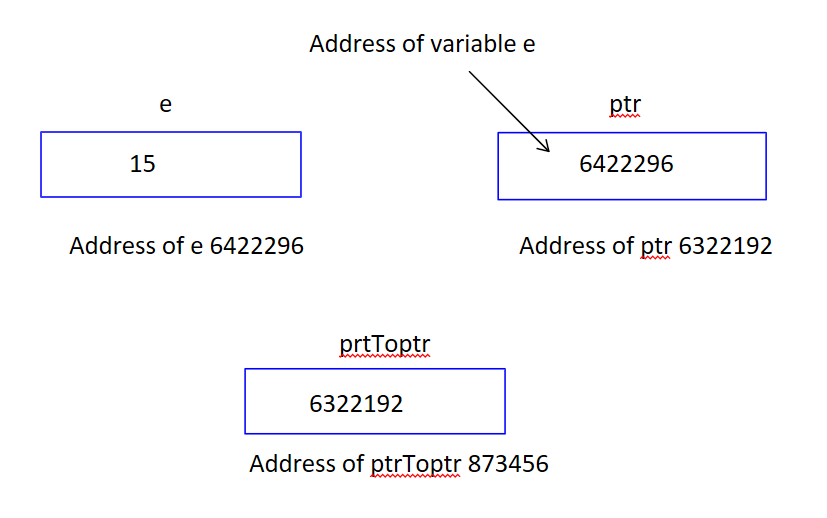
Example
#include <stdio.h>

int main() {
    int value = 50;

    int *ptr = &value;
    int **ptrToptr= &ptr;

    printf("Value: %d\n", value);
    printf("Using pointer: %d\n", *ptr);
    printf("Using pointer to pointer: %d\n", **ptrToptr);

    return 0;
}Output
Value: 50
Using pointer: 50
Using pointer to pointer: 50
Pointer to pointer is not about complexity—it’s about multi-level access to memory. Once you understand that each pointer is just another variable with its own address, this concept becomes completely logical.
Common mistakes (how to avoid them)
Pointers are powerful—but they can also be dangerous if used incorrectly. Most pointer-related errors are not due to complexity…They happen because of small but critical mistakes. In this section, we’ll cover the most common pointer mistakes beginners make, along with clear explanations and fixes.
1. Using uninitialized pointers (most dangerous mistake)
int *p;
*p = 10;
p is pointing to a random memory location. Writing to it can cause crash or undefined behavior. Always initialize pointers before using them.
2. Dereferencing NULL pointer
int *p = NULL;
printf("%d", *p);
NULL points to nothing; dereferencing causes runtime crash. Always check the pointer before dereferencing.
3. Forgetting the address operator (&)
int a = 10;
int *p = a;     // wrong
Pointer expects an address, not value. Use “&” to assign address to pointer.
4. Overcomplicating pointers
- Use multiple pointers unnecessarily.
- Write complex code without need.
As pointers directly interact with memory. So mistakes don’t just cause errors — they can:
- Crash programs
- Corrupt data
- Create hard-to0debug issues
Conclusion
Pointers are one of the most powerful and essential concepts in C programming. They change the way you think about data — from simply using values to directly controlling memory. Once you truly understand pointers, you unlock the ability to write efficient, high-performance programs and work with advanced concepts that form the backbone of real-world systems.
Pointers are not just another topic—they represent a shift in how you think about programming. By now, we have explored:
- How pointers store memory addresses
- How to initialize and dereference them safely
- Why pointers are essential for efficiency and performance
- How they are used in real-world scenarios
- Advanced concepts like pointer to pointer
- And most importantly, how to avoid common mistakes
This knowledge forms the foundation of writing clean, optimized, and scalable C programs. Even after understanding pointers, one important question remains; how exactly do functions behave when passing data? You have already seen that: functions use call by value by default and pointers allow modification of original data. But to fully connect these ideas, you need to understand, call by value vs call by reference in C programming. This concept acts as a bridge between functions and pointers, combining both into a single powerful idea.
Mastering this next concept will help you understand:
- Why values don’t change in normal function calls.
- How pointers enable real data modification.
- When to use call by value vs call by reference.
- Real-world scenarios where each approach is used.
This is where your understanding shifts from writing code to designing efficient systems. Many advanced topics — like arrays, dynamic memory, and data structures — depend heavily on pointers. Understanding pointers deeply will make every future concept in C easier and more logical.
In fact, many advanced array operations are impossible to fully understand without pointers.
Final Thought
Most programmers stop at syntax—but the real power of C lies in understanding how memory works. Pointers are your gateway to that power. Once you master pointers, you don’t write programs — you build efficient, real-world systems with confidence.
