

Data types in C Programming
In previous articles, we wrote simple programs that printed messages on the screen. But real-world programs don’t just display text — they work with different types of data. For example:
- Numbers like age or marks.
- Decimal values like heights or prices.
- Characters like grades or symbols.
This raises an important question: How does the computer know what kind of data it is working with? Because storing a number is different from storing a character. This is where data types in C come into play. In C, we must specify each variable’s type at the time of declaration, and it cannot be changed throughout the program. Let’s understand this with an example:
Imagine building a game without data types
Imagine you are building a video game where:
- Health stores text instead of numbers.
- Player name stores decimal values.
- Score accepts random characters.
As a result, a game would completely break. Now replace “game” with a C program — the same problem happens. Without data types, your program cannot determine:
- What kind of data is it handling
- How much memory to allocate
- How to process that data
There are different kinds of data types in C, as shown in the figure below.
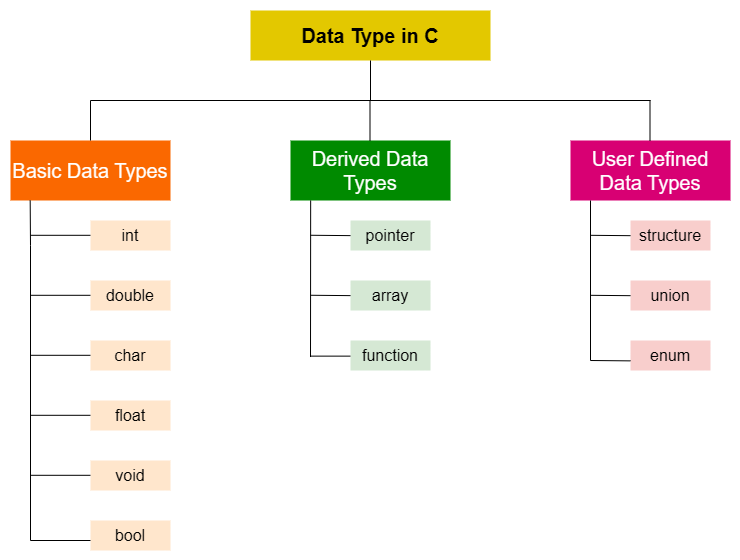
We will discuss basic data types, this is also known as primitive data type.
What you will learn
In this guide, you will learn:
- What data types are
- Why data types are important
- Basic data types in C
- How to use them in a program
- How data is stored in memory
What are data types in C?
A data type tells the computer what kind of value a variable will store. It also helps the computer understand:
- A type of data that a variable can store
- The amount of memory allocated
- How to interpret the stored value
- The operations that can be performed
In simple terms: Data type = types of data you want to store.
Game analogy (core understanding)
Think of a game engine:
| Game Element | C Concept |
| Player health | Integer (int) |
| Player Speed | Float (float) |
| Player Grade | Character (char) |
| Physics Data | Double (double) |
Each element has a specific format. We cannot store speed in characters and grade in decimals.
Why are different data types important
Imagine if a computer didn’t know the type of data. Then it wouldn’t know:
- How much space is required
- Whether the value is a number or a character
- How to process that value
Data types solve this problem by clearly defining the kind of data being used. Key benefits of data types:
- Efficient memory usage
- Type safety
- Better performance
- Clear program logic
Basic data type in C
Let’s understand the most important and commonly used data types.
Integer (int)
The int data type is used to store whole numbers. It does not store decimal values.
- Use the int keyword to declare an integer.
- It stores positive, negative or zero (does not store decimal values).
- The size is typically 4 bytes on modern systems (but may vary depending on the system and compiler), and the range based on the size is -2,147,483,648 to 2,147,483,647.
- To print and scan the value of an integer data type, we use %d (format specifier).
- Operations like subtraction, addition, division, multiplication, bitwise, and modulo can be performed on the int data type.
#include <stdio.h>

int main() {
    int age = 24;

    printf("age = %d", age);

    return 0;
}
Output: age = 24Float
The float data type is used to store decimal (fractional) numbers. It is useful when precision is required. The float data type is sufficient to store the 6-7 decimal digits.
- We use the float keyword to declare the float type.
- the size of a float is 4 bytes, and the range is approximately 3.4e-38 to 3.4e+38.
- %f format specifier is use to print and scan the decimal values in C.
- Operations like addition, multiplication, division and subtraction can be performed on the float data type.
#include <stdio.h>

int main() {
    float price = 12.64;

    printf("price = %f", price);

    return 0;
}
Output: price = 12.64Char (Character data type)
The char data type is used to store a single character like ‘E’, ‘x’, or ‘1’. All these character data types is inside the single quote ‘ ‘. It can also store the ASCII values, but it should not exceed 127.
- The char keyword is used to declare the char type.
- The size of the char data type is 1 byte, it’s range is -128 to 127.
- A char can be either signed or unsigned, depending on the system.
- %c is the format specifier to print and scan the character data type.
- Addition and subtraction operations can be performed on the char data type.
#include <stdio.h>

int main() {
    char grade = 'A';

    printf("grade = %c", grade);

    return 0;
}
Output: grade = ADouble data type
It stores the large decimal value with more precision i.e. stores decimal numbers, but the precision is better than the float. A double data type is sufficient to store up to 15 decimal digits.
- The double keyword is used to declare the double data type.
- Typical size of double data type is 8 bytes, and the range is approximately 1.7e-308 to 1.7e+308.
- The format specifier to print a double data type is %lf.
- We can perform the same operation as float on a double data type.
#include <stdio.h>

int main() {
    double distance = 1232.676394;

    printf("distance = %f", distance);

    return 0;
}
Output: distance = 1232.676394Void data type
The void data type represents the absence or no value. The void type does not represent a value and is mainly used for functions that do not return anything. The void keyword is used to declare the void data type. It can also be used for generic pointers that can store the address of any data type.
#include <stdio.h>

void function() {

}
Bool data type
It is used to represent the logical values (true or false) and use to control the flow of execution. True as 1 and false as 0.
- This kind of data type can be declared by the bool keyword.
- We can use bool by including the standard library header <stdbool.h>.
- This is used to express whether the condition is true or false.
Modifiers in the C data type
Modifiers change how data is stored. There are 4 kinds of data type modifiers. They are used to fine-tune memory allocation and ranges to suit specific needs. So these modifiers make the primary datatype more specific. These modifiers are: signed, unsigned, long, and short.
| Modifier | Purpose | Common Usage |
| signed | Use to represent the both positive and negative values | signed int, signed char |
| unsigned | Only allow positive (non-negative) values. | unsigned int, unsigned char |
| short | It decreases the size and range of the data type | short int |
| long | Increases the size and range of data type. It does have more capacity. | long int, long double |
Memory allocation of data types
In the table below, we have the range, size and format specifier in C for different data types:
| Type | Size in Bytes | Range | Format Specifier |
| char | 1 | -127 to +127 | %c |
| unsigned char | 1 | 0 to 255 | %c |
| signed char | 1 | -127 to +127 | %c |
| int | 2 or 4 | -32,768 to +32,767 or -2,147,483,648 to +2,147,483,647 | %d |
| unsigned int | 2 or 4 | 0 to 65,535 or 0 to 4,294,967,295 | %u |
| signed int | 2 or 4 | -32,768 to +32,767 or -2,147,483,648 to +2,147,483,647 | %d |
| short int | 2 | -32,768 to +32,767 | %hd |
| unsigned short int | 2 | 0 to 65,535 | %hu |
| signed short int | 2 | -32,768 to +32,767 | %hd |
| long int | 4 | -2,147,483,648 to +2,147,483,647 | %ld |
| unsigned long int | 4 | 0 to 4,294,967,295 | %lu |
| signed long int | 4 | -2,147,483,648 to +2,147,483,647 | %ld |
| float | 4 | 1.2e-38 to 3.4e+38 | %f |
| double | 8 | 1.7e-308 to 1.7e+308 | %lf |
| long double | 12 | 3.4e-4932 to 1.1e+4932 | %Lf |
One complete example
Now, let’s combine everything into one simple program and understand everything with the program example. This program shows how different data types are used together.
#include <stdio.h>

int main() {
    int score = 80;
    float speed = 5.34;
    char grade = 'B';
    double distance = 1243.7647;

    printf("score = %d\n", score);
    printf("speed = %f\n", speed);
    printf("grade = %c\n", grade);
    printf("distance = %lf\n", distance);

    printf("The size of int: %d\n", sizeof(int));
    printf("The size of float: %d\n", sizeof(float));
    printf("The size of char: %d\n", sizeof(char));
    printf("The size of double: %d\n", sizeof(double));

    return 0;
}
Output:
score = 80
speed = 5.340000
grade = B
distance = 1243.764700
The size of int: 4
The size of float: 4
The size of char: 1
The size of double: 8In the example above, you noticed the \n in the printf statement in each line, this is used to print the statements in a new line otherwise it will print like a paragraph.
Common mistakes beginners make
- Using the wrong data type (int instead of float)
- Ignoring memory size
- Mixing incompatible types
- Not understanding precision
- Mixing data types
- Using char incorrectly
Small experiment
- Try changing the values and observe the output.
- What happens if you store a decimal value in an int?
- What will happen if you remove \n from the printf statement?
Conclusion
Data types are the foundation of C programming. Choosing the correct data type helps optimize memory usage and performance. If variables are containers, data types define what those containers can hold. Understanding this properly will prevent errors, improve performance and make your code more structured.
Now that you understand how data is stored using different data types, the next question is: How do we perform operations on this data? In real programs, we don’t just store values — we calculate, compare, and manipulate them. This is where operators in C come into play. In the next article, we will explore:
- Arithmetic operations
- Logical operations
- Comparison operators
and how they are used to control program behaviour.
